

Zstd dictionary compression in Cassandra 6.0
Take a table that stores events with recurring field names and similar payloads across many rows. Zstd dictionary compression gives Cassandra 6.0 a way to learn repeated byte sequences from that data and reuse them when writing new SSTables. How much space you save depends on the actual contents of the table so production-like data belongs in the first test.
This post follows pre-release Cassandra 6.0 as reviewed against 6.0-alpha3 so the implementation may change before GA. Check the release notes and upgrade documentation for the version you’re testing before adopting the compressor.
Benefits and caveats
| Potential benefit | Caveat to test before adoption |
|---|---|
| More compact SSTables for tables with recurring byte patterns. | High-entropy values, already compressed payloads, encrypted fields, and highly variable records may see little improvement. |
| Less disk used by SSTables, snapshots, backups, streaming, and compaction output when the ratio improves. | The gain must be measured against the CPU required to train and use the dictionary. |
| Fewer bytes read from storage can help an I/O-bound workload. | Dictionary-aware decompression has its own CPU cost, so read latency needs measurement rather than assumption. |
| A dictionary is stored with the SSTable compression metadata, so older files remain readable after the active dictionary changes. | Multiple dictionary versions consume cache and native Zstd memory until the SSTables that use them have been rewritten or removed. |
Start with a table whose repeated structure gives a dictionary something useful to learn and compare the storage reduction with the extra CPU and memory it uses. Include training and dictionary-cache memory in the test alongside flush and compaction time and read latency. You’ll also need backup and restore checks together with streaming tests before relying on the format for that table.
CASSANDRA-17021 introduces Zstd dictionary compression in the 6.0 line with the tools needed to train and manage dictionaries. Training controls and guardrails sit alongside commands to import and export dictionaries and inspect their metadata and memory use.
Once a dictionary is used by an SSTable you’ll need to be able to inspect and restore it as part of normal storage operations. Those lifecycle tools are part of evaluating the compressor because the files may outlive the dictionary currently active on the table.
Yifan Cai is credited as the author on the primary ticket with Jon Haddad and Stefan Miklosovic as reviewers. I’m grateful for that work and the follow-up effort on training and lifecycle handling as well as observability and tests.
Dictionary compression mechanics
A dictionary gives Zstd common byte sequences it can use from the start of compressing a chunk. Repeated content can then take fewer bytes to represent although highly variable data or payloads already compressed upstream may offer little saving for the extra CPU and memory.
Saving space in SSTables can also reduce the data involved in backups and change how long restores and streaming take. Check compaction and disk headroom alongside those operations because the compressor affects more than the table’s stored size. Decompression happens on the read path so query latency needs to be part of the same comparison.
How Zstd dictionary compression works in an SSTable
Cassandra compresses chunks of the SSTable Data.db component and ordinary Zstd finds repeated patterns within each chunk. With a small chunk it has less data from which to find a match even when the same JSON keys or payload fragments appear throughout the table. A dictionary lets the compressor use repetitions learned from other chunks before it starts on the next one.
Training produces a shared history of byte sequences from representative samples so Zstd can encode matching content with shorter references. The dictionary also supplies information used to build the native compression and decompression tables that process those references.
ZstdDictionaryCompressor operates on SSTables while CQL semantics and the memtable format stay unchanged along with commit-log and internode compression. If a table has no available dictionary it falls back to ordinary Zstd so the first flush can proceed before training has produced one.
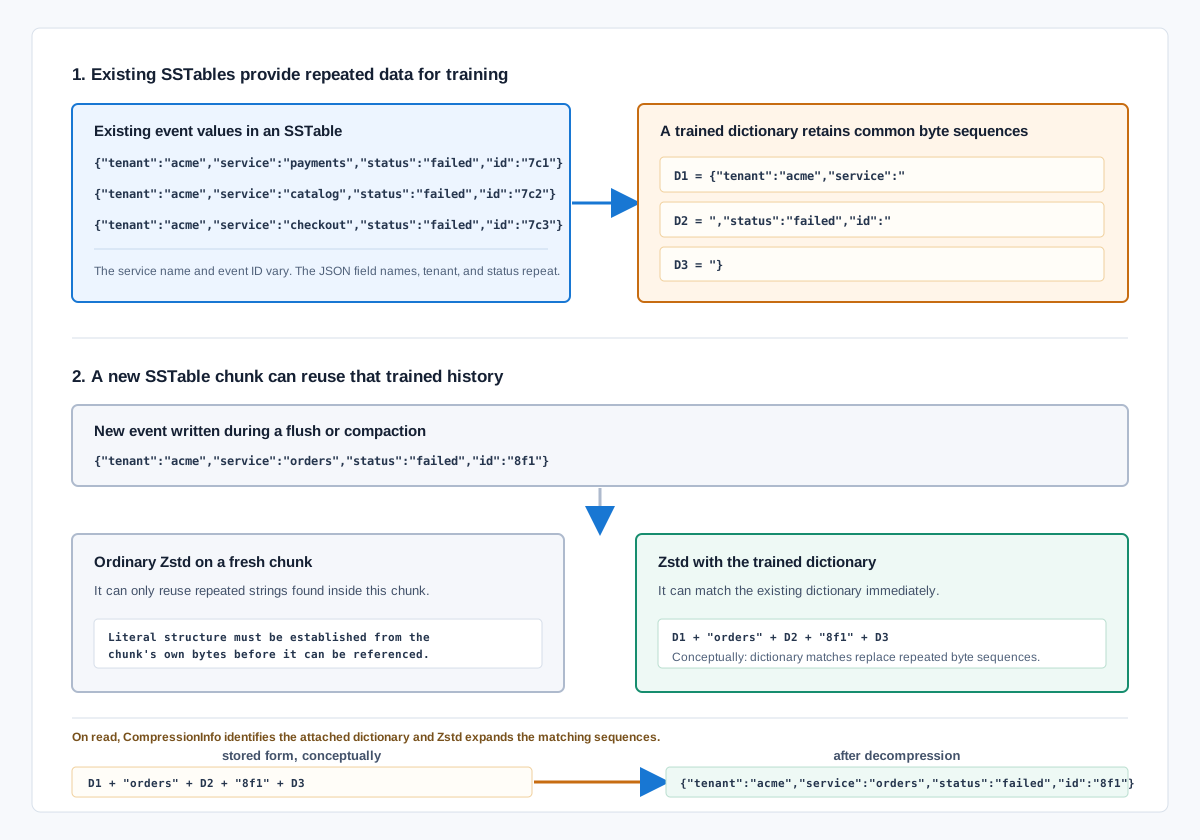
The diagram labels learned sequences from D1 through D3 to show which repeated content can be reused. In Data.db Zstd represents that content in an entropy-coded compressed block using the dictionary as match history rather than storing those explanatory labels.
| SSTable compression step | Cassandra 6.0 implementation |
|---|---|
| Dictionary selection | The table’s dictionary cache tracks the newest dictionary ID as the active dictionary for writes. A new dictionary does not rewrite old SSTables by itself; those files keep the dictionary with which they were written until nodetool recompresssstables or another maintenance operation rewrites them. |
| Chunk compression | ZstdDictionaryCompressor passes each direct byte-buffer chunk to Zstd’s dictionary-aware compression API. Cassandra creates and retains a native ZstdDictCompress object for each compression level used with that dictionary. |
| SSTable metadata | The dictionary ID, dictionary bytes, and a checksum are embedded in the SSTable CompressionInfo component. The SSTable therefore carries the material needed to read its compressed chunks. |
| Chunk decompression | Cassandra reads the dictionary identity from CompressionInfo, resolves it from the local cache or the SSTable metadata, and lazily creates one native ZstdDictDecompress object for that dictionary. Reads then use the matching dictionary rather than assuming the newest dictionary is correct. |
| Cache lifetime | The per-table dictionary cache is bounded and expires entries after a configured period of inactivity. Dictionary and compressor references are counted so eviction cannot free native Zstd state while a compressor is still using it. |
A restored SSTable uses the dictionary it was written with even if the table has since switched to a newer version. Attaching that information to the SSTable also keeps the required dictionary available through streaming and repair as well as node replacement.
Training and publishing a dictionary
Training reads samples from existing canonical SSTables so it learns from the data Cassandra has actually written. If the table has no SSTables the workflow first forces a memtable flush to provide data for sampling. The trainer passes the selected bytes to Zstd and requires at least 11 samples before producing a dictionary.
The CQL parameters let you set the dictionary size and training sample budget together with the minimum interval between training or importing dictionaries. Cassandra 6.0 defaults to a 64KiB maximum dictionary and a 10MiB maximum sample size with training_min_frequency set to 0 for unlimited retraining. The nodetool guidance suggests starting with a sample budget around 100 times the target dictionary size.
ALTER TABLE commerce.events
  WITH compression = {
    'class': 'ZstdDictionaryCompressor',
    'chunk_length_in_kb': '64',
    'compression_level': '3',
    'training_max_dictionary_size': '64KiB',
    'training_max_total_sample_size': '10MiB',
    'training_min_frequency': '24h'
  };
The example uses 24h to limit retraining frequency where the default would allow training again without waiting. Choose a sample budget that represents the rows you expect to write into future SSTables and an interval that avoids creating another dictionary for every small payload change.
Once those parameters are set you can trigger training for the specific table with the following command.
nodetool compressiondictionary train commerce events \
  --max-dict-size 64KiB \
  --max-total-sample-size 10MiB
After training Cassandra combines the Zstd dictionary ID from the generated bytes with a timestamp-based version to make a monotonically increasing Cassandra dictionary ID. It calculates a checksum over the dictionary kind and ID together with the raw bytes before persisting the record in system_distributed.compression_dictionaries. The dictionary enters the local cache before Cassandra announces it to other nodes so they can retrieve a record that already exists.
Dictionary versions and memory
If you retrain a table while older SSTables are still live you’ll have more than one dictionary version in use. New flushes and rewrites use the active version while older SSTables keep referring to the dictionary that compressed them. Cassandra must retain each old version until no live SSTable needs it so frequent retraining adds lifecycle work.
When reviewing memory use you’ll need to count more than the raw dictionary bytes stored on disk. Cassandra creates a decompression object on first use and can create separate compression objects for every compression level in use. nodetool tablestats reports cached dictionary memory so you can compare it with table count and compaction activity as the number of versions changes.
A small number of dictionaries trained on stable data patterns is easier to manage than continually producing new versions. Keep the versions needed by existing SSTables and check whether retraining improves compression enough to justify adding another one.
Dictionary lifecycle
| Stage | Cassandra 6.0 behaviour | Operator checks |
|---|---|---|
| Training | A dictionary is trained from representative table or SSTable samples through Cassandra’s dictionary workflow, subject to configured size and retraining controls. | Use data that reflects the current application payload and retain the training configuration. |
| Metadata | Cassandra records dictionary information in system_distributed.compression_dictionaries, including the table relationship and creation time. | Confirm the expected dictionary is present and that old or orphaned entries are understood. |
| SSTable writes | New SSTables written with a compatible dictionary-capable compressor can use the active dictionary. | Compare SSTable size, flush time, CPU use, and compaction behaviour with the existing compressor. |
| Reads and compaction | Cassandra needs the relevant dictionary to decompress the SSTable data during normal reads and storage maintenance. | Measure read latency, compaction throughput, memory use, and behaviour during streaming or replacement. |
| Import, export, and retirement | nodetool compressiondictionary supports managed dictionary workflows, including cleanup [--dry] for orphaned dictionaries. | Rehearse export, import, cleanup, restore, and rollback before treating the feature as a production default. |
The following tools let you inspect and manage those dictionaries while checking which SSTables still depend on them.
nodetool compressiondictionarysubcommands for dictionary management- Metadata in
system_distributed.compression_dictionaries - Dictionary memory reporting in
nodetool tablestats - CQL controls for training parameters
- Import and export support for controlled dictionary workflows
nodetool compressiondictionary cleanup [--dry]for orphaned dictionariesnodetool recompresssstablesto rewrite existing SSTables with the active dictionary- Safeguards for dictionary size and sample budgets as well as retraining intervals
Give each table’s dictionary configuration an owner and a rollback plan with monitoring that shows how the change affects the workload.
Testing a candidate table
Choose a table with a stable data format and enough stored data for a compression improvement to justify the work. Compare the dictionary configuration with the current compressor using production-like partitions and TTLs while retaining representative tombstones and write rates.
Compare compression ratio and SSTable size with the current configuration while recording compaction throughput and disk utilisation. Check read latency against the CPU spent reading and compacting data and include dictionary memory and flush behaviour in the results. Restore and bulk-load timings belong in that comparison too and the test needs repeating if an application update changes the payload format.
Restore imported dictionaries in a fresh environment and check that the tools you use can read the resulting files. Exercise node replacement and streaming with the candidate configuration so you know how recovery behaves before the table depends on it.
Where AxonOps fits
In AxonOps you can compare a change in disk growth with table size and compaction backlog during the dictionary test. I/O saturation and read latency help show whether the storage saving comes with a cost to requests. Configuration history keeps the measurements tied to the compressor settings used for each run.
Series
- Apache Cassandra 6.0 Part 1: Notes from Using Cassandra Since 2008
- Apache Cassandra 6.0 Part 2: Accord Transactions
- Apache Cassandra 6.0 Part 3: Performance Optimisations
- Apache Cassandra 6.0 Part 4: Repair, Guardrails, and Observability
- Apache Cassandra 6.0 Part 6: Transactional Cluster Metadata and CMS
- Apache Cassandra 6.0 Part 7: Cursor Compaction and SSTable Writes
- Apache Cassandra 6.0 Part 8: Storage-Attached Indexing and Schema Constraints
- Apache Cassandra 6.0 Part 9: JDK 21 and Generational ZGC
- Apache Cassandra 6.0 Part 10: Upgrade and Production Validation
Sources
- Apache Cassandra 6.0 CHANGES.txt
- CASSANDRA-17021: Zstd dictionary compression
- CASSANDRA-20902: CEP-54 Zstd dictionary compression
- CASSANDRA-20941: compression dictionary commands
- CASSANDRA-21078: dictionary training parameters in CQL
- CASSANDRA-21157: compression dictionary lifecycle handling
- CEP-54: ZSTD with Dictionary SSTable Compression
- Cassandra 6.0 ZstdDictionaryCompressor source
- Cassandra 6.0 CompressionDictionaryManager source