
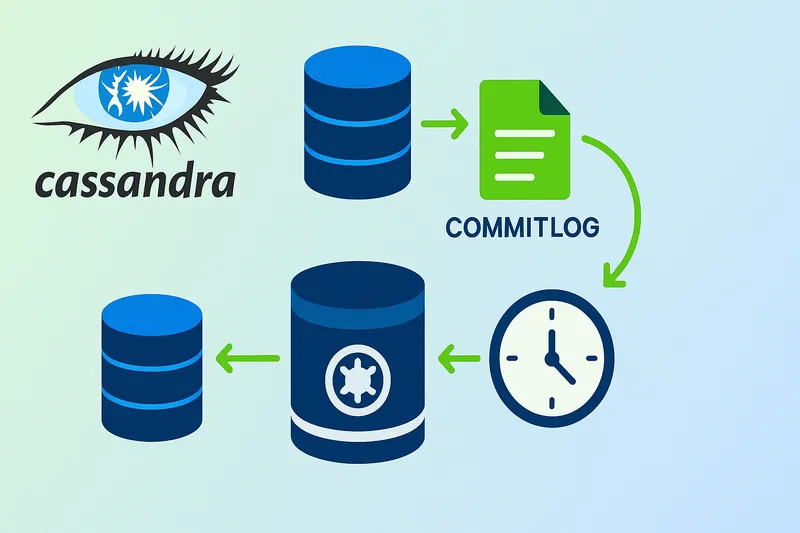
AxonOps Cassandra® Commitlog Archiving and Point-in-Time-Restore Feature
By Hayato Shimizu
The AxonOps unified monitoring and operations platform ensures Apache Cassandra teams have all the tools at their disposal in one place to deliver the performance and reliability they need . Ensuring those teams are able to easily and reliably manage their backups has been a key component of the platform from day one, and working with the advanced capability of. Cassandra’s commitlog archiving has always been a challenge.
AxonOps is delighted to unveil the latest release of our backup capability, which has made the complex simple and will significantly enhance how you handle data backups and restorations: Commitlog Archiving and Point-in-Time Restore (PITR).
Commitlog Archiving and Point-in-Time Restore
For ordinary writes to a keyspace with durable writes enabled Cassandra records mutations in the commitlog before applying them to the memtable. The memtable is later flushed to SSTables. Commitlog replay allows a node to recover writes that had not reached SSTables before it stopped.
Archiving preserves completed commitlog segments outside the node so they remain available after the original files have been recycled or lost. A recovery process can restore a snapshot and replay the subsequent archived mutations up to a configured timestamp.
The snapshot must precede the desired recovery point and the archive must cover the writes needed after it. The cutoff uses mutation timestamps, which may be supplied by clients. Missing segments or unexpected client timestamps can affect the recovered data, so a successful replay still needs application-level validation.
AxonOps brings archive configuration and restore operations into its Cassandra backup and restore interface. Backup monitoring and regular recovery tests remain part of operating that process.
The Traditional Challenges of Cassandra Commitlog Archiving and Point-in-Time Restore
Typically, setting up Commitlog Archiving and Point-in-Time Restore in Cassandra is a complex and time-consuming process. It involves configuring various components, ensuring compatibility between different systems, and maintaining an intricate setup that can often be fragile and prone to errors. These configurations require in-depth knowledge and continuous monitoring to ensure everything runs smoothly.
Configuring Commitlog Archiving
Apache Cassandra 4.1 and 5.0 configure commitlog archiving in conf/commitlog_archiving.properties. This is a properties file rather than a commitlog_archiving block in cassandra.yaml. The Cassandra 5.0 configuration template defines the commands and timestamp format used below.
For example, a node with independently mounted backup storage can archive completed segments with this setting. Give each node its own archive directory and make sure the Cassandra service account can write to it.
archive_command=/bin/cp %path /mnt/cassandra-archive/node-1/%nameHere %path is the source segment’s full path and %name is its filename. A directory on the Cassandra data disk would still be lost if that disk failed. Check the uploaded files and archive failures as part of your backup monitoring. Remote storage may require an archive script with its own verification and error handling.
Completed segments must be archived before they are needed for recovery. The newest writes may still be in an active segment, so the recovery point depends on the segments that have reached backup storage. Keep a suitable snapshot and its schema alongside the archive.
Configuring Point-in-Time Restore
Restore into an isolated environment using a procedure appropriate to the Cassandra version and topology. The following properties illustrate commitlog replay for one recovery node after its snapshot and schema have been restored. They are not a complete cluster restore procedure.
restore_command=/bin/cp -f %from %to
restore_directories=/mnt/cassandra-archive/node-1
restore_point_in_time=2025:07:24 12:00:00
precision=MICROSECONDS
The restore command uses %from for the archived segment and %to for its restore destination. The cutoff is expressed in GMT using the format supported by the installed version. Cassandra compares mutation timestamps with this cutoff rather than the wall-clock time at which a backup file was copied.
- Stop the recovery node and keep it isolated from the live cluster and application writes.
- Restore a compatible snapshot taken before the desired recovery point with the schema needed to interpret its data. Follow the selected restore procedure for table identities and node ownership.
- Make the required archived segments available and set the restore properties for that node. A missing segment can leave an unrecoverable gap after the snapshot.
- Start the recovery node to replay eligible mutations and check its logs for restore or replay errors.
- Validate application data and record the achieved recovery time before making the recovered data available to applications.
Replaying commitlogs cannot undo data already present in a snapshot. A snapshot taken after an accidental deletion cannot be moved backwards simply by setting an earlier replay cutoff. Test the full process with your application data before relying on it during an incident.
Options for utilizing Cassandra commitlog archiving for point-in-time-restore?
Cassandra commitlog archiving is a powerful capability but complex to work with. Here are options to consider.
-
Specialist commercial backup tools: The likes of Cohesity and Rubrik deliver point-in-time-restore for Cassandra.
-
Unified management tools: AxonOps delivers support for both open source Apache Cassandra and DataStax Enterprise. DataStax provides support via OpsCenter solely for DataStax Enterprise, their commercial distribution of Cassandra.
-
Custom Scripts: Many organizations resort to custom scripting often in combination with open-source projects such as Medusa which will demand considerable expertise and ongoing management.
Why AxonOps for Cassandra point-in-time-restore?
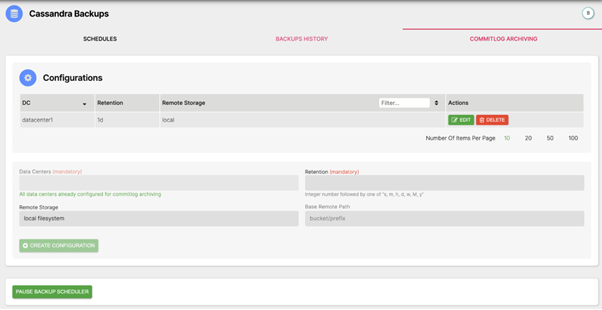
- Seamless and reliable integration to Cassandra commitlog archive
AxonOps manages commitlog archiving through its backup interface and records archive activity so operators can check whether the segments required for recovery reached backup storage.
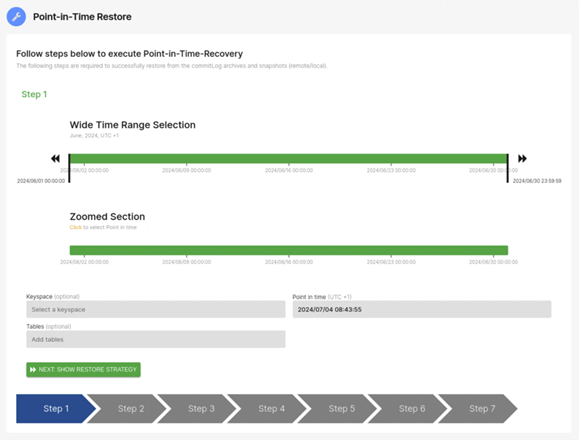
- Precision restoration made simple
AxonOps provides a restore workflow for selecting a recovery point within the available snapshot and commitlog coverage. Validate the recovered records before returning them to the application because the replay cutoff follows mutation timestamps.
- Back up to any storage anywhere
AxonOps understands that flexibility in choosing backup locations is crucial for modern businesses. That’s why our solution supports a wide range of target backup locations, including:
-
Local Storage: Keep your data close and easily accessible.
-
SSH/SFTP: Securely transfer your backups to remote servers.
-
Amazon S3: Leverage the power of AWS for scalable and durable storage.
-
Google Cloud Storage (GCS): Tap into Google’s robust cloud infrastructure.
-
Azure Blob: Utilize Microsoft Azure for high-availability and resilient data storage.
No matter where you prefer to store your backups, AxonOps has got you covered, ensuring that your data is safe and easily retrievable.
Conclusion
AxonOps already delivers a robust Cassandra backup and restore capability relied upon by many Cassandra accounts. The addition of the Commitlog Archiving and Point-in-Time Restore capability with simplicity of zero configurations and dynamic switching sets a new standard for unified Cassandra monitoring and operations. Whether you’re a seasoned Cassandra user or just starting out, these features will empower you to manage your data with unprecedented control and confidence.
More Information
AxonOps Documentation – https://docs.axonops.com/pitr/overview/
AxonOps Free Starter (6 Nodes) - https://axonops.com/pricing/
AxonOps Demo Sandbox - https://axonops.com/demo-sandbox/
Get in touch - community@axonops.com