
Comparing Kafka Management Tools in 2026
Choosing a Kafka management tool usually starts with something we need to get done. We might need to inspect a record that a consumer cannot process or give developers access to their topics without letting them change another team’s configuration.
The tables below compare AxonOps with seven alternatives to help us check the operations we need against each tool’s access controls and deployment requirements. The existing Lenses and Kpow coverage now sits alongside Kafbat UI for teams considering an open-source Kafka management tool.
The Kafka Operations Challenge
Kafka powers real-time data pipelines across most large organisations at this point, but operating Kafka clusters day-to-day involves a lot of moving parts:
- Cluster Health Monitoring: Tracking broker status, partition distribution, and replication lag
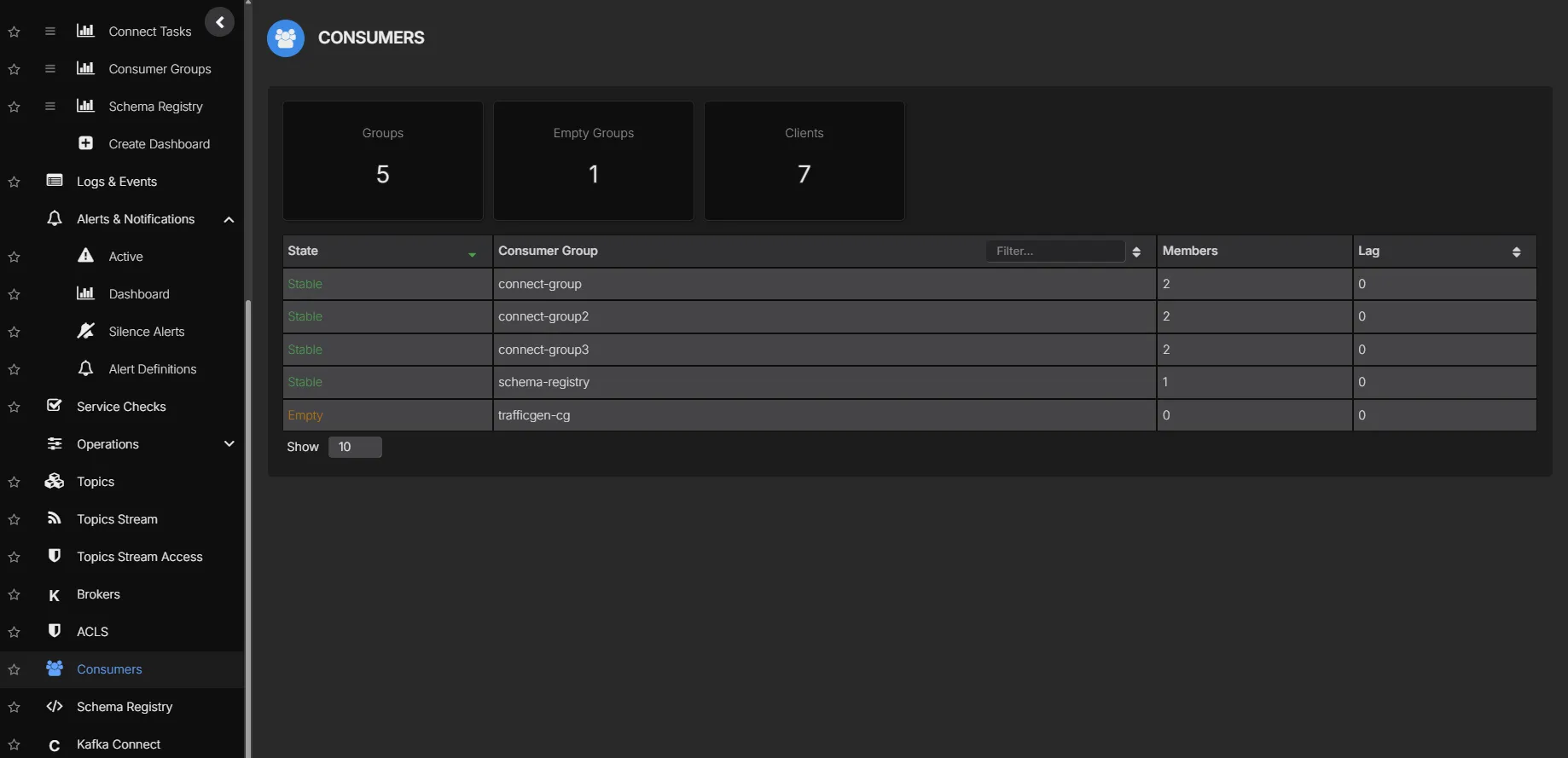
- Consumer Group Management: Monitoring consumer lag, rebalancing, and offset management
- Schema Evolution: Managing schema compatibility and versioning across services
- Connector Operations: Deploying, monitoring, and troubleshooting Kafka Connect pipelines
- Security & Compliance: Implementing RBAC, auditing, and regulatory compliance
- Multi-Cluster Management: Operating across development, staging, and production environments
Without proper tooling, you end up with fragmented visibility, manual configuration management, gaps in access control and auditing, and slow incident response.
What to Look for in a Kafka Management Tool
Core Operations
- Broker Management: Health monitoring, configuration, rolling restarts
- Topic Management: Creation, configuration, partition management
- Consumer Group Visibility: Lag monitoring, offset management, member tracking
- Message Browsing: Inspect messages with proper deserialization
Enterprise Requirements
- Role-Based Access Control (RBAC): Granular permissions by team, environment, or resource
- Single Sign-On (SSO): SAML 2.0, OIDC, LDAP integration
- Audit Logging: Complete audit trail for compliance
- Multi-Tenancy: Isolation between teams and projects
Ecosystem Integration
- Schema Registry: Schema management, compatibility enforcement, evolution tracking
- Kafka Connect: Connector deployment, monitoring, and troubleshooting
- Multi-Cluster: Centralized management across environments
Tool Overview
AxonOps
AxonOps is a unified operations platform for Apache Kafka that covers monitoring, management, and governance in a single interface.
What sets it apart:
- Works with any Kafka: Apache Kafka, AWS MSK, Confluent, Aiven, Instaclustr, self-managed
- High-resolution metrics: 5-second granularity for real-time visibility
- Centralized log collection: Aggregate and analyze logs across your Kafka estate
- Rich alerting integrations: PagerDuty, Slack, Microsoft Teams, ServiceNow, Email, Webhooks
- Service health checks: Custom checks to monitor Kafka ecosystem health
- Flexible deployment: Both SaaS and Self-Hosted options available
- Enterprise-grade RBAC with SAML/OIDC integration
- Comprehensive audit logging for compliance
- Automated partition balancing (coming soon)
- Unified platform for Kafka, Schema Registry, and Connect
- Cost-effective per-cluster licensing model
Confluent Control Center
Confluent’s commercial management interface, designed for their Confluent Platform distribution. Deep integration with the Confluent ecosystem, but tightly coupled to it.
Considerations:
- Tightly coupled to Confluent Platform
- Requires Confluent Platform license
- Higher total cost of ownership
- Complex deployment requirements
Conduktor
A desktop and web-based Kafka management tool focused on developer experience and team collaboration.
Considerations:
- Separate licensing for different features
- Growing feature set
- Desktop app heritage shows in architecture
AKHQ (Formerly KafkaHQ)
An open-source Kafka GUI with basic management capabilities for Kafka clusters, Schema Registry, and Kafka Connect.
Considerations:
- Open-source with community support
- Limited enterprise features
- No commercial support option
- Basic RBAC capabilities
Redpanda Console
The web-based UI for Redpanda (formerly Kowl), which also supports Apache Kafka clusters.
Considerations:
- Primarily designed for Redpanda
- Modern UI/UX
- Limited Schema Registry support
- Growing feature set
Kafbat UI
Kafbat UI is an open-source Kafka UI maintained by contributors to the earlier Provectus project. Its Apache 2.0 licence covers the software rather than charging per user or Kafka cluster.
Suppose a consumer is falling behind on one partition and we want to inspect the records it is receiving. Kafbat provides a message browser with CEL filters alongside per-partition consumer lag. We can also manage topics and Kafka ACLs through the same application. Its 1.5.0 release includes live consumer-lag updates and connector-level permissions.
For Kafka Connect the versioned API exposes configuration validation and task restarts as well as connector pause and resume. Schema Registry operations include registering a schema and checking its compatibility before changing a subject. Configure the Connect and registry endpoints for each Kafka cluster that needs those integrations.
Considerations:
- OAuth2/OIDC and resource-scoped roles are available in the open-source project. UI permissions control what a signed-in user can do through Kafbat while Kafka still checks the permissions of the clients connecting to it.
- Masking rules can hide selected fields in displayed messages. Configure the topic patterns and check them against the records your teams can access.
- The audit log records operations performed through Kafbat to a Kafka topic or the application console. Enable it explicitly and use
ALLwhen reads must be logged because the default level isALTER_ONLY. - Broker metrics require a configured JMX or Prometheus endpoint. The 1.5.0 statistics scheduler refreshes its cache every 30 seconds by default. That interval does not establish how much historical data is retained or how often the browser refreshes consumer lag.
- You run the application and maintain its configuration even when the software has no licence fee. Kafbat advertises professional services and enterprise support separately and the terms need to be agreed in a support contract.
Lenses
Lenses lets us search for a topic across Kafka environments and inspect its records with SQL before opening the consumer groups or connectors that use it. Its topic and schema catalogue brings those resources together so we can follow a record through the services involved in processing it.
Users connect to Lenses HQ while an agent in each Kafka environment connects to the brokers and supporting services. Broker monitoring requires access to the configured metrics endpoints as well as Kafka itself.
Considerations:
- The Connect editor validates configurations against the Connect cluster and shows task health with stack traces for failures.
- IAM policies restrict actions on specific resources through roles assigned to groups.
- The Community Edition provides a starting point for evaluation. Confirm the licence needed for your production environments and governance requirements.
- Include HQ and the environment agents in the deployment plan along with the database used by the agents.
Kpow
Kpow from Factor House combines Kafka administration with record inspection and consumer-group monitoring. We can inspect a failed connector task and its stack trace before opening the configuration or restarting that task through its Connect management interface.
Kpow uses Kafka client APIs to collect snapshots and stores its metrics and audit data in internal Kafka topics. Its system requirements describe a one-minute snapshot interval and deployment as a container or Java application without a separate database.
Considerations:
- Multiple clusters can share an installation together with their configured Schema Registry and Connect services.
- The Enterprise permissions separate viewing connector configuration from changing it or restarting a task.
- The Community Edition supports up to three clusters and ten users. SSO and RBAC require Enterprise alongside data masking and the full audit log.
- Follow the persistence rules when planning failover because only one instance may use full persistence against the same primary cluster.
Feature Comparison
The Kafbat entries were checked against its 1.5.0 source and project documentation on 21 September 2026. The Lenses and Kpow entries retain their 16 September 2026 review. These are documentation checks rather than benchmark results. Features can depend on the release and licence. Not verified means the sources reviewed did not establish that capability and does not mean the product lacks it.
When comparing monitoring coverage we also need to check which measurements are available and how long they remain accessible. The Kafka monitoring metrics guide covers the broker and client measurements involved. The consumer-lag guide explains how to interpret the offsets shown in a management UI.
Core Kafka Management Features
Kafka Cluster Management Capabilities
| Feature | AxonOps Enterprise | Confluent Control Center Commercial | Conduktor Commercial | AKHQ OSS | Redpanda Console OSS | Lenses | Kpow | Kafbat UI |
|---|---|---|---|---|---|---|---|---|
| Supported Kafka Distributions | Apache Kafka, Confluent, Strimzi | Confluent Platform only | Apache Kafka, MSK, Confluent, any | Apache Kafka, any distribution | Redpanda, Apache Kafka | Apache Kafka and managed services | Apache Kafka and managed services | Apache Kafka and MSK |
| Broker Health Monitoring | ✓ Full | ✓ Full | ✓ Full | ◐ Basic | ◐ Basic | JMX metrics access required | Kafka API snapshots | JMX / Prometheus access required |
| Topic Management | ✓ Full CRUD | ✓ Full CRUD | ✓ Full CRUD | ✓ Full CRUD | ✓ Full CRUD | ✓ Create / edit / delete | ✓ Create / edit / delete | Create / edit / delete |
| Partition Management | ✓ Full | ✓ Full | ✓ Full | ◐ Limited | ◐ Limited | ✓ Increase partition count | ✓ Reassign replicas | Increase partitions and replication factor |
| Consumer Group Management | ✓ Full | ✓ Full | ✓ Full | ✓ Full | ✓ Full | ✓ Groups and offsets | ✓ Groups and offsets | Groups and offsets |
| Consumer Lag Monitoring | ✓ Real-time | ✓ Real-time | ✓ Real-time | ◐ Polling | ✓ Real-time | ✓ Lag alerts | ✓ Lag and group history | Per-partition live lag |
| Message Browser | ✓ Advanced | ✓ Advanced | ✓ Advanced | ✓ Good | ✓ Good | ✓ Record browsing and SQL | ✓ Data inspect | CEL filters and SerDes |
| Offset Reset | ✓ Full | ✓ Full | ✓ Full | ✓ Full | ◐ Limited | Inactive groups | ✓ Reset offsets | Reset group offsets |
| ACL Management | ✓ Full | ✓ Full | ✓ Full | ◐ View Only | ◐ View Only | ✓ Kafka ACLs | ✓ Create / delete ACLs | Create / delete ACLs |
| Multi-Cluster Support | ✓ Unified View | ◐ Per Cluster | ✓ Unified View | ✓ Config-based | ◐ Limited | ✓ HQ and per-environment agents | ✓ Multiple clusters | Configured clusters |
| Metrics Resolution | ✓ 5-second high-resolution | ◐ 1 minute | ◐ 1 minute | ✗ No metrics storage | ✗ No metrics storage | 5-second broker refresh default | 1-minute snapshots | 30-second statistics cache default |
| Log Collection & Analysis | ✓ Built-in aggregation | ◐ Via Confluent | ✗ No | ✗ No | ✗ No | Not verified | Not verified | Not verified |
| Alerting & Notifications | ✓ PagerDuty, Slack, Teams, ServiceNow, Email, Webhook | ✓ Built-in | ◐ Basic | ✗ None | ✗ None | ✓ PagerDuty / Slack / webhooks and more | Prometheus export for external alerting | Prometheus export for external alerting |
| Service Health Checks | ✓ Custom checks | ◐ Limited | ✗ No | ✗ No | ✗ No | Built-in infrastructure rules | Not verified | Application health endpoint verified |
| Automated Partition Balancing | ✓ Coming Soon | ✓ Self-Balancing Clusters | ✗ No | ✗ No | ✗ No | Not verified | Not verified | Not verified |
Enterprise Security & Compliance
Enterprise Security & Compliance Features
| Security Feature | AxonOps | Confluent Control Center | Conduktor | AKHQ | Redpanda Console | Lenses | Kpow | Kafbat UI |
|---|---|---|---|---|---|---|---|---|
| SAML 2.0 SSO | ✓ Native | ✓ Via Confluent | ✓ Enterprise | ✗ No | ◐ Enterprise | ✓ HQ SAML configuration | ✓ Enterprise | Not verified |
| OIDC Support | ✓ Native | ✓ Via Confluent | ✓ Enterprise | ✓ Basic | ✓ Yes | Not verified | ✓ Enterprise | OAuth2 / OIDC configuration |
| LDAP Integration | ✓ Full | ✓ Full | ◐ Limited | ◐ Basic | ✗ No | Not verified | ✓ Enterprise via JAAS | LDAP / Active Directory |
| Role-Based Access Control | ✓ Granular | ✓ Confluent RBAC | ✓ Good | ◐ Basic Roles | ◐ Basic | ✓ IAM roles and policies | ✓ Enterprise RBAC | Open-source RBAC |
| Resource-Level Permissions | ✓ Full | ✓ Full | ✓ Full | ◐ Limited | ✗ No | ✓ Resource-scoped policies | ✓ Enterprise resource policies | Cluster and resource policies |
| Team/Group Management | ✓ Full | ✓ Via Confluent | ✓ Full | ✗ No | ◐ Basic | ✓ Groups and role membership | Identity-provider roles | Identity-provider group mapping |
| Comprehensive Audit Logging | ✓ Full Trail | ✓ Full Trail | ◐ Limited | ✗ No | ✗ No | ✓ User actions | ✓ Enterprise audit log | UI operations when enabled |
| Audit Log Export | ✓ Multiple Formats | ✓ Yes | ◐ Limited | ✗ No | ✗ No | ✓ Splunk / webhooks / JSON file | ✓ Kafka topic and webhooks | Kafka topic or console |
| Compliance Reports | ✓ Built-in | ◐ Manual | ✗ No | ✗ No | ✗ No | Not verified | Not verified | Not verified |
| Multi-Tenancy | ✓ Native | ◐ Via Confluent | ✓ Yes | ✗ No | ✗ No | IAM resource scoping | ✓ Enterprise tenants | Cluster/resource-scoped roles |
| Data Masking | ✓ Configurable | ◐ Limited | ✓ Yes | ✗ No | ✗ No | ✓ Field-based data policies | ✓ Enterprise | Configured field and topic patterns |
| IP Allowlisting | ✓ Yes | ✓ Yes | ◐ Enterprise | ✗ No | ✗ No | Not verified | Not verified | Not verified |
RBAC Role Examples
AxonOps RBAC Role Capabilities
| Permission | Super Admin | Cluster Admin | Developer | Read-Only |
|---|---|---|---|---|
| View Clusters | ✓ | ✓ | ✓ | ✓ |
| Create/Delete Topics | ✓ | ✓ | ◐ Assigned Only | ✗ |
| Produce Messages | ✓ | ✓ | ✓ | ✗ |
| Manage Consumer Groups | ✓ | ✓ | ◐ Assigned Only | ✗ |
| Manage Connectors | ✓ | ✓ | ◐ Limited | ✗ |
| Manage Schemas | ✓ | ✓ | ✓ | ✗ |
| Manage Users/Roles | ✓ | ✗ | ✗ | ✗ |
| View Audit Logs | ✓ | ✓ | ✗ | ✗ |
| Configure Alerts | ✓ | ✓ | ◐ View Only | ◐ View Only |
Kafka Connect Management
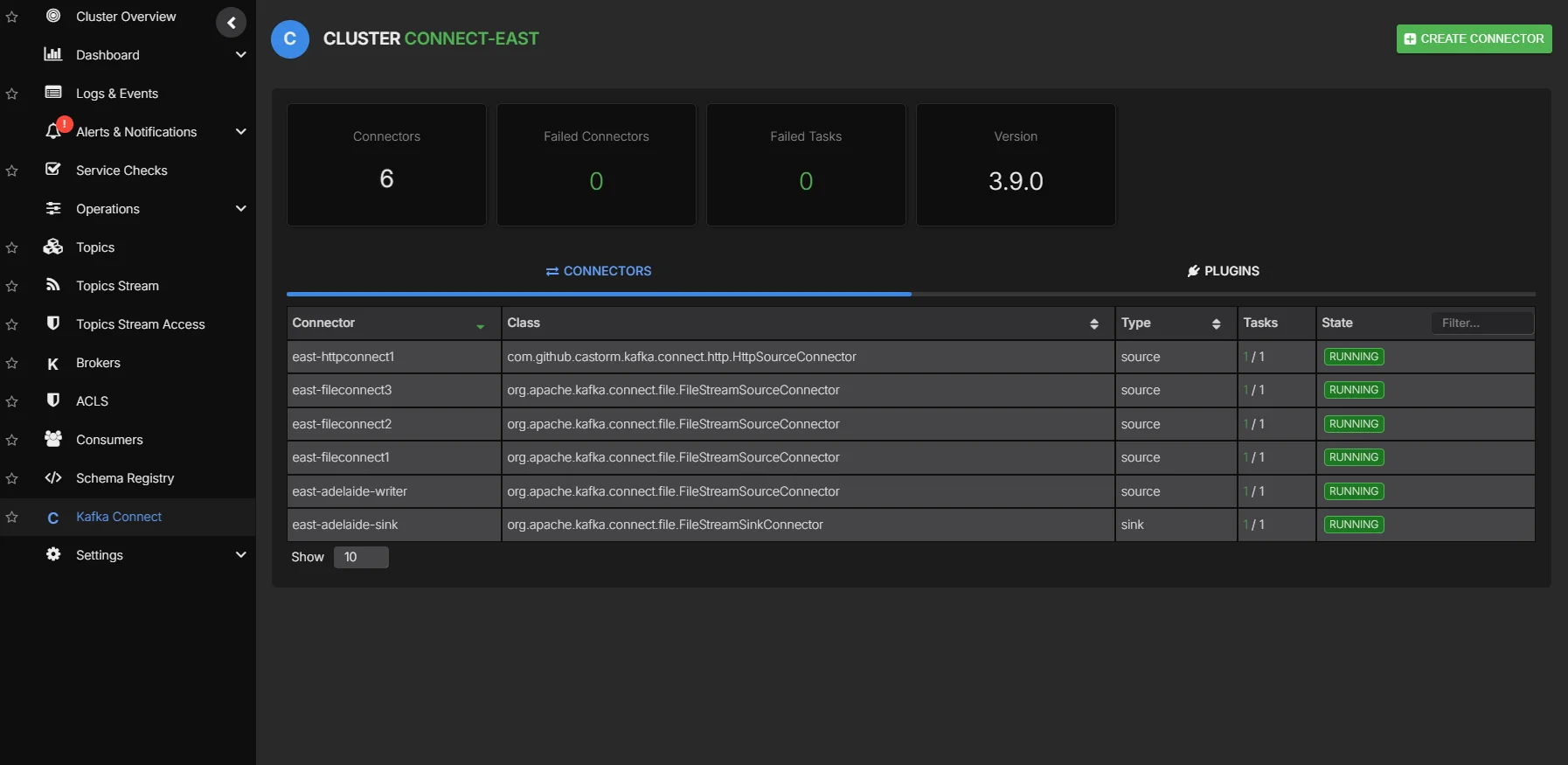
Kafka Connect Management Capabilities
| Connect Feature | AxonOps | Confluent Control Center | Conduktor | AKHQ | Redpanda Console | Lenses | Kpow | Kafbat UI |
|---|---|---|---|---|---|---|---|---|
| Connector Discovery | ✓ Auto-detect | ✓ Auto-detect | ✓ Auto-detect | ✓ Auto-detect | ◐ Manual | ✓ Configured Connect clusters | ✓ Configured Connect clusters | Configured Connect endpoints |
| Connector Deployment | ✓ JSON Editor | ✓ UI Wizard | ✓ UI Wizard | ✓ JSON Editor | ◐ Basic | ✓ Editor with plugin completion | ✓ Plugin-based forms | Create and edit configurations |
| Configuration Validation | ✓ Real-time | ✓ Real-time | ✓ Real-time | ✗ No | ✗ No | ✓ Validate against Connect | ✓ Form validation errors | Validate against Connect |
| Task Status Monitoring | ✓ Real-time | ✓ Real-time | ✓ Real-time | ✓ Polling | ◐ Basic | ✓ Task health view | ✓ Task state view | Task state view |
| Error Log Aggregation | ✓ Centralized | ✓ Centralized | ◐ Limited | ✗ No | ✗ No | Task stack traces | Task stack traces | Task failure traces |
| Connector Metrics | ✓ Comprehensive | ✓ Comprehensive | ◐ Basic | ◐ Basic | ✗ No | JMX configuration required | Connect API snapshots | Task status via Connect API |
| Task Restart | ✓ One-click | ✓ One-click | ✓ One-click | ✓ One-click | ◐ Limited | ✓ Individual tasks | ✓ Individual tasks | Individual tasks |
| Connector Pause/Resume | ✓ Full | ✓ Full | ✓ Full | ✓ Full | ◐ Limited | ✓ Connector state controls | ✓ Connector state controls | Connector state controls |
| Dead Letter Queue Management | ✗ No | ✓ Built-in | ◐ Manual | ✗ No | ✗ No | Not verified | Not verified | Not verified |
| Connector Templates | ✓ Planned | ✓ Hub | ✓ Yes | ✗ No | ✗ No | Plugin completion and snippets | Forms from installed plugins | Installed plugin discovery |
Schema Registry Operations
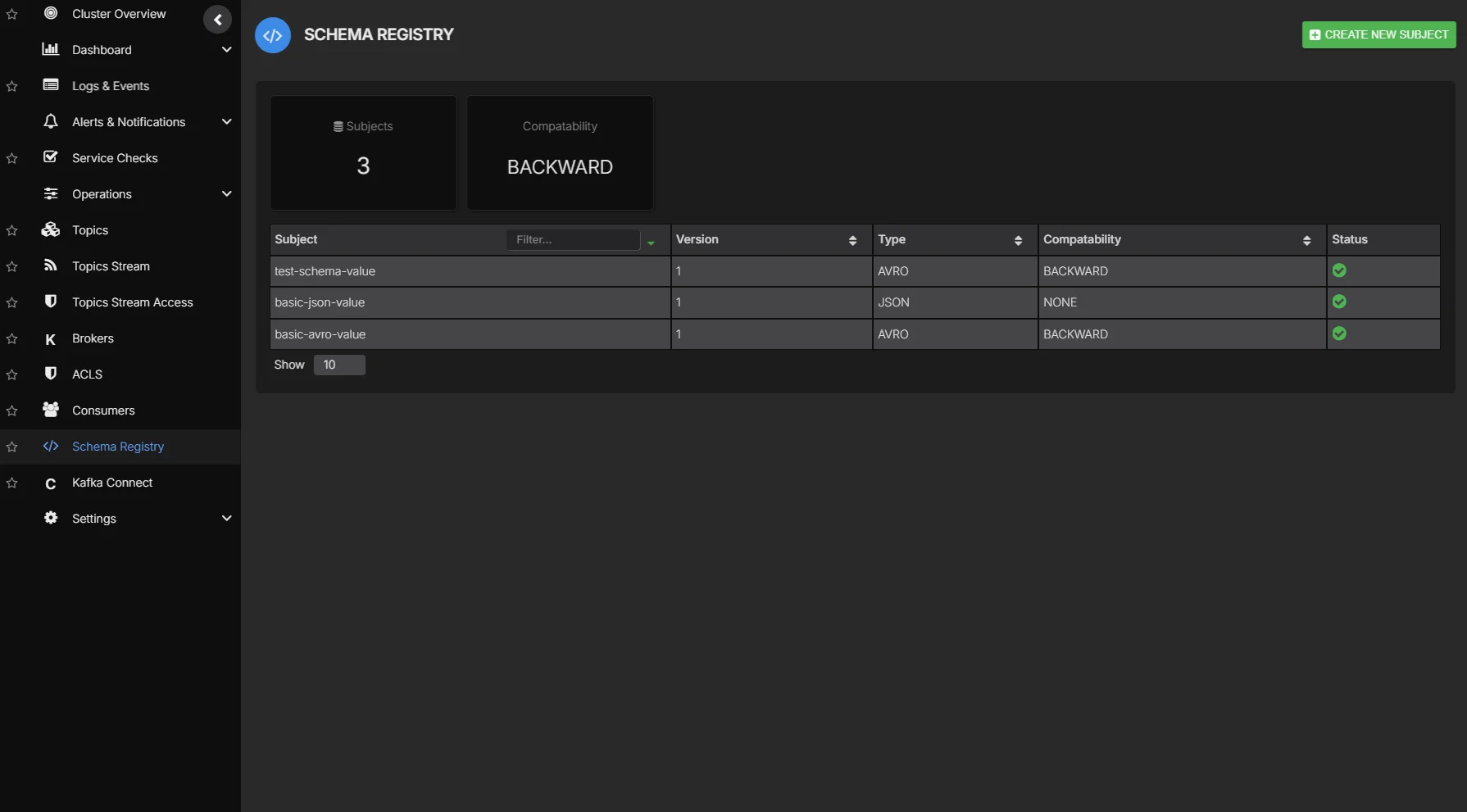
Schema Registry Management Features
| Schema Feature | AxonOps | Confluent Control Center | Conduktor | AKHQ | Redpanda Console | Lenses | Kpow | Kafbat UI |
|---|---|---|---|---|---|---|---|---|
| Schema Browser | ✓ Full | ✓ Full | ✓ Full | ✓ Full | ◐ Basic | ✓ Schema catalogue | ✓ Subjects and schemas | Subjects and versions |
| Avro Support | ✓ Full | ✓ Full | ✓ Full | ✓ Full | ✓ Full | ✓ Via Schema Registry | ✓ Avro subjects | Avro schemas |
| JSON Schema Support | ✓ Full | ✓ Full | ✓ Full | ✓ Full | ◐ Limited | Not verified | ✓ JSON Schema subjects | JSON Schema |
| Protobuf Support | ✓ Full | ✓ Full | ✓ Full | ◐ Limited | ◐ Limited | ✓ Via Schema Registry | ✓ Protobuf subjects | Protobuf schemas |
| Schema Registration | ✓ UI & API | ✓ UI & API | ✓ UI & API | ✓ UI & API | ◐ API Only | Registry API | ✓ UI and API | Register subjects and versions |
| Compatibility Testing | ✓ Pre-register | ✓ Pre-register | ✓ Pre-register | ✗ No | ✗ No | Not verified | Not verified | Registry compatibility check |
| Version History | ✓ Full Diff | ✓ Full Diff | ✓ Full Diff | ✓ Basic | ◐ Limited | ✓ Schema versions | ✓ Subject versions | Subject versions |
| Schema Comparison | ✓ Visual Diff | ◐ Basic | ✓ Visual Diff | ✗ No | ✗ No | Diff for Lenses-managed schemas | Not verified | Not verified |
| Subject Management | ✓ Full | ✓ Full | ✓ Full | ✓ Full | ◐ Basic | Registry API | ✓ Create / edit / delete | Create / read / delete |
| Compatibility Mode Config | ✓ Per-Subject | ✓ Per-Subject | ✓ Per-Subject | ◐ Global Only | ◐ Global Only | ✓ Per-subject API | ✓ Per subject | Global and per-subject API |
| Schema References | ✓ Full Support | ✓ Full Support | ◐ Limited | ✗ No | ✗ No | Not verified | Not verified | Schema references in API |
| Schema Search | ✓ Full-text | ◐ Basic | ✓ Full-text | ◐ Basic | ✗ No | ✓ Topic and schema catalogue | Subject listing | Subject listing |
Pricing and Licensing
Pricing & Licensing Comparison
| Pricing Aspect | AxonOps | Confluent Control Center | Conduktor | AKHQ | Redpanda Console | Lenses | Kpow | Kafbat UI |
|---|---|---|---|---|---|---|---|---|
| Licensing Model | Per Broker | Per Broker | Per User | Open Source | Open Source / Enterprise | Commercial licence | Per cluster (Enterprise) | Apache 2.0 |
| Free Tier | ✓ Available | ✗ No | ✓ Limited | ✓ Full (OSS) | ✓ Basic | ✓ Community Edition | ✓ Community: 3 clusters / 10 users | Open-source software |
| Enterprise Features | ✓ Included | ◐ Add-on Cost | ◐ Enterprise Plan | ✗ Not Available | ◐ Enterprise Plan | Confirm licence | Enterprise plan | RBAC and audit available in OSS |
| Schema Registry Mgmt | ✓ Included | ✓ Included | ✓ Included | ✓ Included | ◐ Limited | Licence-dependent | ✓ Community and Enterprise | Included in OSS |
| Connect Management | ✓ Included | ✓ Included | ✓ Included | ✓ Included | ◐ Limited | ✓ Available | ✓ Community and Enterprise | Included in OSS |
| Cost at Scale (10 Brokers) | Low | High | Medium | Free | Low | Request a quote | Depends on cluster count and plan | No software licence fee |
| Support Included | ✓ Enterprise | ✓ Enterprise | ✓ Paid Plans | ✗ Community | ◐ Enterprise | Confirm contract | Community or priority support | Services available separately |
| SLA Guarantee | ✓ Yes | ✓ Yes | ◐ Enterprise Only | ✗ No | ◐ Enterprise Only | Confirm contract | Confirm contract | Confirm support contract |
| On-Premises Option | ✓ Yes | ✓ Yes | ✓ Yes | ✓ Yes (Self-host) | ✓ Yes | ✓ Self-hosted HQ and agents | ✓ Self-hosted | Self-hosted |
Total Cost of Ownership
Deployment & Operations
Deployment & Operational Characteristics
| Deployment Aspect | AxonOps | Confluent Control Center | Conduktor | AKHQ | Redpanda Console | Lenses | Kpow | Kafbat UI |
|---|---|---|---|---|---|---|---|---|
| Deployment Model | ✓ SaaS + Self-Hosted | Self-Hosted only | ✓ SaaS + Self-Hosted | Self-Hosted only | Self-Hosted only | Self-hosted HQ and agents | Self-hosted container or JAR | Self-hosted container or JAR |
| Deployment Complexity | Low | High | Medium | Low | Low | HQ / agents / database | Application and Kafka permissions | Application and Kafka permissions |
| Docker Support | ✓ Official | ✓ Official | ✓ Official | ✓ Official | ✓ Official | ✓ Official images | ✓ Official image | Official image |
| Kubernetes / Helm | ✓ Helm Chart | ✓ Helm Chart | ✓ Helm Chart | ✓ Helm Chart | ✓ Helm Chart | ✓ HQ and Agent charts | ✓ Helm chart | Project Helm chart |
| High Availability | ✓ Built-in | ✓ Built-in | ◐ Manual | ◐ Manual | ◐ Manual | Confirm HQ and Agent topology | Active/passive with persistence limits | Configure replicas and sticky sessions |
| Resource Requirements | Low | High | Medium | Low | Low | Size by topic and schema count | Vendor recommends 8 GB / 2 CPUs | Not benchmarked |
| Dependencies | Minimal | Confluent Stack | PostgreSQL | Minimal | Minimal | HQ and Agent databases | Kafka internal topics | Configured Kafka services |
| Learning Curve | Easy | Steep | Moderate | Easy | Easy | Not benchmarked | Not benchmarked | Not benchmarked |
| Documentation Quality | ✓ Comprehensive | ✓ Extensive | ✓ Good | ◐ Basic | ✓ Good | Installation and user guides | Installation and API guides | Installation and configuration guides |
Verdict
Why AxonOps
Looking at the tables above, a few things stand out about AxonOps compared to the alternatives:
- Works with any Kafka distribution: Apache Kafka, AWS MSK, Confluent, Aiven, Instaclustr, or self-managed. No vendor lock-in.
- 5-second metrics granularity with centralized log collection.
- Alerting integrations out of the box: PagerDuty, Slack, Microsoft Teams, ServiceNow, Email, and Webhooks.
- SaaS or self-hosted, same features either way.
- SAML/OIDC, granular RBAC, and audit logging included, not behind an enterprise upsell.
- Per-cluster pricing that doesn’t penalise you for scaling up instance sizes.
- Automated partition balancing coming soon.
Recommendations by Use Case
| Use Case | Recommended Tool | Rationale |
|---|---|---|
| Enterprise Production | AxonOps | Comprehensive features, enterprise security, cost-effective |
| Confluent Platform | Confluent Control Center | Native integration, if budget permits |
| Developer Workstations | Conduktor or AxonOps | Good desktop experience |
| Development/Testing | AKHQ or AxonOps Free | Cost-effective for non-production |
| Redpanda Users | Redpanda Console | Native Redpanda support |
| SQL exploration across Kafka environments | Lenses | SQL record inspection with a shared topic and schema catalogue |
| Kafka administration with approval workflows | Kpow Enterprise | Resource permissions with an audit log and staged changes |
| Open-source Kafka UI with resource permissions | Kafbat UI | Self-hosted management with configurable RBAC and audit logging |
Getting Started
The AxonOps Kafka overview shows how these capabilities fit together. Explore Kafka monitoring and topic management for the dashboards and administration workflows behind the comparison.
Sign up for a free account at axonops.com, connect your Kafka cluster, and you’ll have visibility across your topics, consumer groups, and schemas within minutes. RBAC, SSO, and alerting can be configured from there.
Request a demo or start your free trial.
Frequently Asked Questions
What is the best Kafka management tool for enterprises?
AxonOps covers the most ground for enterprise use: SAML/OIDC, granular RBAC, audit logging, 5-second metrics, centralized log collection, and per-cluster pricing. It also works with any Kafka distribution, which Confluent Control Center does not.
How does AxonOps compare to Confluent Control Center?
Confluent Control Center is tightly coupled to the Confluent Platform and requires a Confluent license. AxonOps offers comparable enterprise features at a lower cost and works with any Apache Kafka distribution, not just Confluent’s.
What Kafka management tools support Schema Registry?
Kafbat UI supports schema registration and compatibility checks through its configured registry connection. The table above compares these operations with the schema tooling in AxonOps and the other products covered here so we can check the particular schema formats and editing operations we need.
Is there a free Kafka management tool?
Kafbat UI and AKHQ are open-source options while AxonOps also offers a free tier. Kafbat includes the documented access controls and audit logging described above without a separate enterprise software licence. For a production installation we still need to configure those controls and decide who maintains the application and handles support.
What features should I look for in a Kafka management tool?
Broker health monitoring, topic and consumer group management, Schema Registry support, Kafka Connect management, RBAC, SSO integration (SAML/OIDC), audit logging, multi-cluster support, and alerting. The feature comparison tables above cover all of these across the main tools.