
If you’re running Kafka across three availability zones you’ll probably have a replication factor of three with min.insync.replicas=2 and acks=all. With rack-aware placement you can put one replica in each zone and keep accepting writes after one zone fails as long as the surviving replicas stay in sync and the cluster can elect a leader.
Before relying on that arrangement it’s worth checking where each partition’s replicas are running today. A reassignment may have moved two of them into the same zone even though the topic still has three replicas and its replication settings haven’t changed.
Let’s follow one partition through that situation to see which writes Kafka can acknowledge and what happens if a zone becomes unavailable. Then we’ll look at the placement checks you can use to find affected partitions before an outage.
Replication Settings
We’ll start with a partition that has three assigned replicas and brokers configured with broker.rack values matching their availability zones. Kafka’s rack-aware assignment can use those values to spread the replicas across the three zones when it creates the partition.
In the diagrams the orders topic has two partitions called p0 and p1. Each broker is a Kafka node and each labelled partition box is a replica stored on that broker.
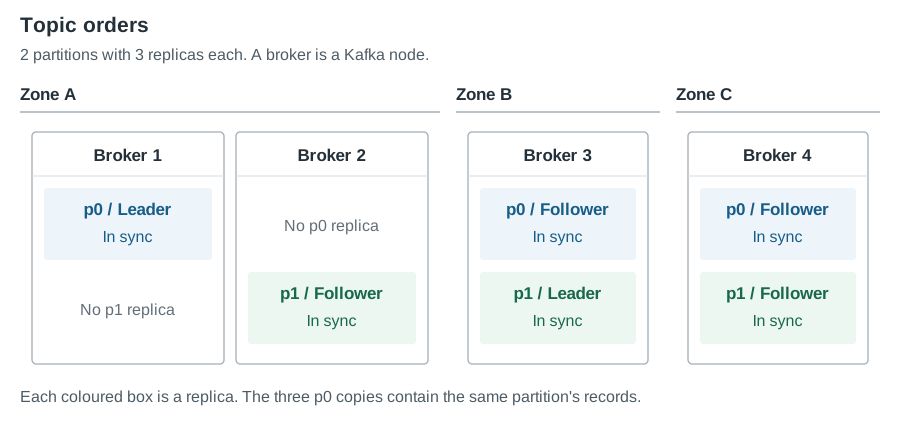
The in-sync replica set (ISR) contains the replicas that are keeping up with the leader. A follower can leave the ISR when it falls behind during a broker restart or a period of slow disk access and rejoin after catching up.
With min.insync.replicas=2 Kafka requires at least two in-sync replicas for a successful acks=all write. When all three replicas remain in the ISR the write reaches all three before the producer receives a successful acknowledgement.
That minimum is a count of replicas without a requirement for them to occupy different zones. Two in-sync replicas in one zone can satisfy the same minimum as two replicas in separate zones. To understand the protection you’ve configured we need to look at both the replica count and where those replicas run.
One Zone Failure
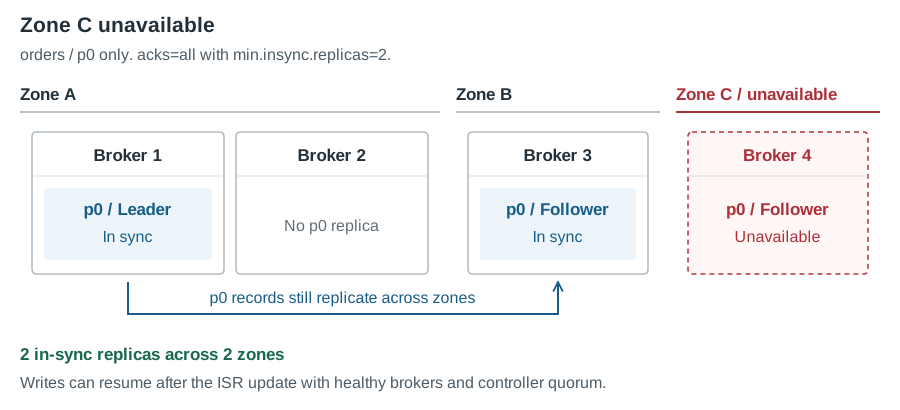
Suppose our partition has one in-sync replica in each of zones A, B and C. If zone C becomes unavailable the two surviving replicas can still satisfy min.insync.replicas=2. With the surviving brokers and controller quorum available the partition can elect a leader if needed and producers can resume writing after the transition.
Now let’s change the placement so that two replicas are in zone A and the third is in zone B. While all three remain in sync an acks=all write still reaches both zones because the producer waits for the replica in B too.
Next suppose the B replica falls behind during a broker restart and leaves the ISR. Kafka can continue acknowledging writes through the two in-sync replicas in A because they still satisfy the configured minimum. Those new writes can be acknowledged before any replica outside zone A has received them.
| Partition state | Replicas in the ISR | Can the ISR satisfy the minimum of two? |
|---|---|---|
| One replica in each zone with all three in sync | One each in A, B and C | Yes, across three zones |
| Two replicas in A and one in B with all three in sync | Two in A and one in B | Yes, across two zones |
| The replica in B falls behind and leaves the ISR | Two in A | Yes, within zone A alone |
If zone A then fails before B receives those records the remaining replica is missing writes that the producers were told had succeeded. With unclean leader election disabled the partition has to wait for a replica containing the acknowledged data to return before it can recover safely.
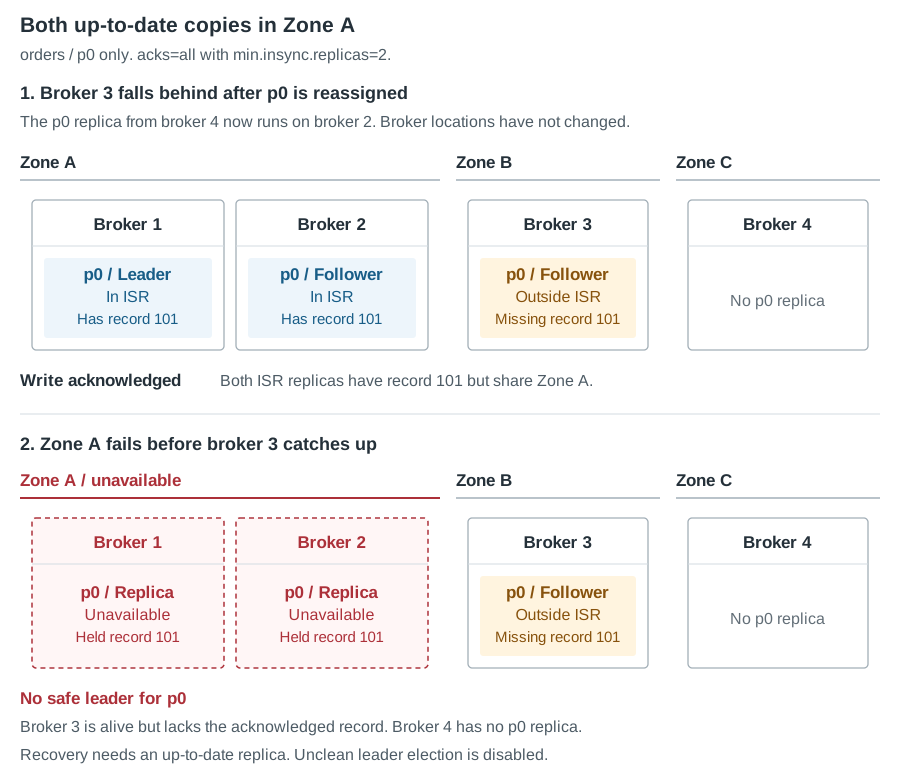
Recovering those writes depends on whether the replicas in A return with their data intact because B cannot supply the missing records if A’s disks are permanently lost. Allowing the stale B replica to become leader through unclean election can also discard the acknowledged records it never received.
Our initial one-replica-per-zone layout avoided this particular sequence because any two replicas occupied two different zones. We now need to check how the assignment could have changed since the topic was created.
Replica Placement Changes
Rack-aware assignment is used when creating partitions and by reassignment tools that take broker racks into account. Configuring broker.rack doesn’t make Kafka automatically move existing replicas back into a three-zone layout after a different assignment has been applied.
There are several points in a cluster’s life where it’s worth reviewing the resulting placement.
- Replacing a failed broker may involve a manual reassignment that puts its replicas alongside another copy in the same zone.
- Adding partitions introduces new assignments whose rack spread depends on how those assignments were generated or supplied.
- Expanding and rebalancing a cluster can change the distribution if the tool isn’t configured to preserve the required rack spread.
- A migration or disaster-recovery exercise may leave assignments that need to be reviewed against the destination cluster’s broker-to-zone mapping.
These operations can preserve the replication factor while changing the number of zones a partition spans. For our three-replica topic we need to check that every partition still has one replica in each of the three zones after the change.
Check Replica and ISR Placement
You can start with the replica IDs and ISR listed by kafka-topics --describe and match each broker ID to its reported broker.rack. Count the distinct racks in the full replica assignment and then repeat the calculation for the replicas currently in the ISR.
For the final row in our example you’ll find two racks in the assignment but only one in the ISR. Comparing those counts with the intended three-zone layout explains the exposure much more directly than checking the replication factor alone.
An under-replicated partition alert would identify that one of the three replicas has left the ISR. It wouldn’t tell you that the remaining two share a zone while an alert for falling below min.insync.replicas wouldn’t fire yet. Consumer lag measures progress through the topic so it can’t tell you whether the up-to-date replicas occupy separate zones.
Keep both placement and ISR membership available when investigating a replication alert so you can check whether a second failure would affect every up-to-date copy. A partition with replicas assigned across three zones can still have a reduced ISR during maintenance so the assigned placement and current replication state need separate attention.
Replication and Write Availability
You might consider changing min.insync.replicas to three so all three replicas have to remain in sync for successful acks=all writes. In our two-zone example that would stop new writes being acknowledged after the B replica leaves the ISR and would therefore prevent the single-zone acknowledgements described above.
It also means that losing any one replica stops successful acks=all writes until the minimum can be met again. You’ll need to allow for that during broker maintenance as well as failures. The setting strengthens the acknowledgement requirement but doesn’t move a replica into the missing third zone.
Adding more replicas can provide additional copies across failure domains when they’re placed accordingly. It also increases storage use and replication traffic so decide which failures you need to tolerate before choosing the count and placement together.
The min.insync.replicas setting doesn’t express a required number of zones so whichever minimum you choose needs to be supported by the actual assignment and the rack membership of the replicas that can acknowledge writes.
Check Rack Awareness with AxonOps
AxonOps’ Rack Awareness check counts the racks in each partition’s assignment and alerts on topics below Minimum Racks. It uses the reported broker.rack values and resolves the placement alert once every partition in the topic meets the threshold.
The screenshot uses Minimum Racks = 2 to detect partitions confined to one rack. For our three-zone example you’d use 3 to catch the two-zone assignment before the replica in B falls behind. Check the topic replication factors first because an RF=2 topic cannot meet a three-rack requirement.

Set broker.rack on each broker and choose a threshold supported by both the cluster’s rack count and the topics’ replication factors. Without reported racks the comparison has no rack membership to count and can alert across the replicated topics when enabled.
You can also use the check to flag RF=1 topics and control that behaviour through Ignore Single Replication Factor as explained in the Advanced Checks documentation.
Keep ISR monitoring enabled alongside this check because it evaluates replica assignments without inspecting current ISR membership or reading min.insync.replicas and producer acks settings. The Kafka topology and replication guides explain how those settings work together.
Checks After Cluster Changes
Make the placement check part of the review after replacing brokers or adding partitions and after an expansion or migration. Compare the resulting rack counts with the layout you intended and investigate any partition that falls short while the reason for the change is still easy to trace.
Check the rack configuration in your rebalancing tool before applying its assignments too. Balancing disk use won’t preserve a three-zone layout unless the assignment also respects that requirement.
Finally record the failure behaviour you expect alongside the replication settings in your operational documentation. For this example that includes whether writes can continue after one zone fails and what happens when a replica falls behind first. The team responding to an outage can then compare the actual placement and ISR with the conditions the cluster was designed to tolerate.