
You’ve got an application writing orders to Kafka and another reading them for fulfilment. Everything works with the current schema and now the producer team wants to add delivery instructions without requiring every consumer to change at the same time.
A schema registry gives those applications somewhere to register and retrieve their schemas while checking whether a proposed change is compatible with the versions already in use. Choosing one also means deciding where that metadata lives and who can change it when several teams share the same Kafka infrastructure.
We’ll compare AxonOps Schema Registry with Karapace and Apicurio alongside Confluent Schema Registry before trying that change to an order schema. We develop AxonOps Schema Registry and wanted to offer a database-backed registry with authentication and access controls included in the open source project.
The comparison uses project documentation and source checked in September 2026 with the API example run against AxonOps Schema Registry 0.4.0-mcp-phase7. The Apicurio entries refer to its 3.1 documentation because storage options and configuration have changed between releases.
Registry Comparison
All four registries support Avro and Protobuf as well as JSON Schema so we’ll start with the storage and licensing differences before looking at access controls.
| Registry | Licence | Production storage | Schema formats | Runtime |
|---|---|---|---|---|
| AxonOps Schema Registry | Apache 2.0 | PostgreSQL or MySQL or Cassandra 5.0+ | Avro and Protobuf plus JSON Schema | Go executable |
| Karapace | Apache 2.0 | Kafka | Avro and Protobuf plus JSON Schema | Python |
| Apicurio Registry 3.1 | Apache 2.0 | PostgreSQL or Kafka | Kafka schema formats plus API artifacts such as OpenAPI and AsyncAPI | Java |
| Confluent Schema Registry | Confluent Community License for the server | Kafka | Avro and Protobuf plus JSON Schema | Java |
The Confluent repository lists the client and serializer modules that use Apache 2.0 separately from the server. Its Community License is source-available so the server shouldn’t be labelled as another Apache-licensed open source option.
Confluent Schema Registry
Confluent is the registry many Kafka applications already use through its serializers and REST API. Keeping it can avoid a migration when the existing deployment meets your requirements and the licensing terms suit your use.
Its schema metadata is stored in Kafka and its security options include HTTP Basic authentication and TLS. Additional authorisation features depend on the Confluent Platform configuration and edition so a comparison needs to identify the particular feature being evaluated.
Karapace
Karapace provides an Apache-licensed alternative with Kafka-backed storage and a Confluent-compatible API alongside a REST proxy for applications that need HTTP access to Kafka.
Karapace supports registry authentication and endpoint access rules through registry_authfile and its current main-branch documentation also describes OIDC authentication with optional role-based authorisation. Check the release you’re deploying for those newer settings because a main-branch feature isn’t necessarily included in an older package.
Apicurio Registry
Apicurio Registry 3.1 covers API artifacts as well as Kafka schemas and provides both its native API and a Confluent-compatible API. That broader scope is useful when the same team wants to manage OpenAPI definitions alongside event schemas.
Its documentation recommends PostgreSQL for production and also supports Kafka storage when that is the preferred backend. You can use in-memory storage for development as long as you don’t need its contents to survive a restart.
AxonOps Schema Registry
AxonOps stores schemas in a database you choose and runs as a Go executable without requiring a JVM or Python installation. You can use PostgreSQL or MySQL for an existing database environment and Cassandra 5.0 or later for its distributed storage capabilities.
Authentication and RBAC are included in the Apache-licensed registry and it can run independently of the commercial AxonOps platform. The project repository includes the source and release downloads alongside its configuration and API documentation.
Storage and Availability
Suppose your team already runs PostgreSQL with established backup and recovery procedures and would like to use the same infrastructure for schema storage. AxonOps and Apicurio can both use PostgreSQL while Confluent and Karapace put the registry metadata in Kafka.
That Kafka dependency doesn’t create an unavoidable startup loop because the registry’s internal storage records don’t depend on your application schemas being registered first. For a team already operating Kafka it may be a familiar dependency to maintain.
AxonOps registry instances coordinate writes through database transactions and locking with PostgreSQL or MySQL and through lightweight transactions with Cassandra. Multiple registry instances can serve requests without electing a registry leader because the selected database handles that coordination.
| AxonOps backend | How writes are coordinated | Where it fits |
|---|---|---|
| PostgreSQL | Transactions and database constraints | Teams already operating PostgreSQL or choosing the documented default for production |
| MySQL | Transactions with row locking for identifier allocation | Teams with an existing MySQL service |
| Cassandra 5.0+ | Lightweight transactions with configurable consistency | Distributed deployments including multiple datacentres |
| Memory | In-process locking without persistence | Local experiments and disposable tests |
The following fragment comes from the configuration described in the storage documentation and uses the postgresql backend name with the database login under user.
storage:
  type: postgresql
  postgresql:
    host: postgres.example.com
    port: 5432
    database: schema_registry
    user: schema_registry
    password: "${SCHEMA_REGISTRY_PG_PASSWORD}"
    ssl_mode: verify-full
The password comes from the environment and verify-full requires a trusted server certificate that matches the database hostname. This is a storage fragment to combine with the registry’s server and security configuration rather than a complete production configuration.
Authentication and Permissions
Our fulfilment application needs to retrieve schemas but shouldn’t be able to delete them. A deployment pipeline may need to register a new version while the platform team retains control of compatibility settings and user administration.
| Registry | Authentication | Permissions |
|---|---|---|
| AxonOps | Basic authentication and API keys plus JWT and LDAP or OIDC integration | Built-in roles separate schema reads and registrations from deletion and administration |
| Karapace | HTTP Basic through registry_authfile plus OIDC in the current main-branch documentation | Endpoint access rules with optional OIDC role checks in the documented implementation |
| Apicurio 3.1 | OIDC with configurable authentication options | Role-based and artifact-owner authorisation options |
| Confluent | HTTP Basic using JAAS plus TLS and documented platform integrations | Basic access roles and additional authorisation options depending on the deployment and edition |
These entries follow the projects’ own Karapace authentication documentation and Apicurio security documentation alongside Confluent’s security configuration. An identity provider can also connect a registry to a directory service without the registry implementing LDAP itself.
AxonOps Roles
The four AxonOps roles let us give the fulfilment application read access and the pipeline permission to register schemas without giving either one user-administration privileges.
| Role | Schema permissions | Configuration and administration |
|---|---|---|
readonly | Read schemas and check compatibility | Read configuration and mode |
developer | Read and register schemas | Read configuration and mode |
admin | Read and register or delete schemas | Change configuration and mode with read access to user administration |
super_admin | Full schema access | Full administration including user management |
For a Keycloak deployment we can map realm roles to these registry roles through the security.auth configuration. The provider must issue a token with the configured audience and role claim for the mapping to apply.
security:
  auth:
    enabled: true
    methods:
      - oidc
    oidc:
      enabled: true
      issuer_url: "https://keycloak.example.com/realms/kafka"
      client_id: schema-registry
      required_audience: schema-registry
      roles_claim: realm_access.roles
      role_mapping:
        kafka-schema-admin: admin
        kafka-schema-developer: developer
        kafka-schema-reader: readonly
      default_role: readonly
    rbac:
      enabled: true
      default_role: readonly
The authentication guide also covers API-key expiry and LDAP group mapping. AxonOps supports mTLS for verifying client certificates at the transport layer and uses an authentication method such as OIDC to supply the user identity for RBAC.
Additional AxonOps Security Features
The registry also includes controls for request rates and audit records alongside certificate reloads. These can be enabled in the same service without adding a separate gateway just to obtain those features.
| Capability | Configuration and behaviour |
|---|---|
| Rate limiting | Token-bucket limits with configurable request rate and burst allowance |
| Audit logging | Structured events with configurable outputs including files and webhooks |
| Certificate reload | TLS certificate reload support without a process restart |
| Secret storage | Optional HashiCorp Vault storage for authentication data |
The configuration reference and audit logging guide explain how to set the limits and send audit events to your existing logging service.
Registering and Evolving a Schema
Let’s try the order change using a local AxonOps registry so we can see what gets registered and what a compatibility check returns. This example uses curl and jq with the in-memory backend and doesn’t require Kafka because we’re exercising the registry API directly.
Download and extract the archive for your system from the 0.4.0-mcp-phase7 release. From the extracted directory start the executable with a loopback address so this unauthenticated test service isn’t exposed to other machines.
SCHEMA_REGISTRY_HOST=127.0.0.1 SCHEMA_REGISTRY_PORT=18081 \
  ./schema-registry
In a second terminal set the registry address and register the schema for an order containing an order_id and a total_pence value. The subject name orders-value follows the topic-based naming convention for the value schema of an orders topic.
REGISTRY=http://127.0.0.1:18081

ORDER_V1='{
  "type": "record",
  "name": "Order",
  "namespace": "com.example.orders",
  "fields": [
    {"name": "order_id", "type": "string"},
    {"name": "total_pence", "type": "long"}
  ]
}'

jq -n --arg schema "$ORDER_V1" '{schemaType: "AVRO", schema: $schema}' |
  curl --fail-with-body --silent --show-error \
    -H 'Content-Type: application/vnd.schemaregistry.v1+json' \
    --data-binary @- "$REGISTRY/subjects/orders-value/versions"
On a fresh in-memory registry this registers the schema with identifier 1 and returns the following response. An existing registry can assign a different identifier because other schemas may already have been registered.
{"id":1}Now set the subject’s compatibility policy to BACKWARD so a proposed reader schema must be able to read data written with the previous schema.
curl --fail-with-body --silent --show-error \
  -X PUT "$REGISTRY/config/orders-value" \
  -H 'Content-Type: application/vnd.schemaregistry.v1+json' \
  -d '{"compatibility":"BACKWARD"}'
Let’s add delivery_instructions with a default of null so an updated reader has a value to use when it encounters an older order without that field.
ORDER_V2=$(printf '%s' "$ORDER_V1" | jq '.fields += [{
  "name": "delivery_instructions",
  "type": ["null", "string"],
  "default": null
}]')

jq -n --arg schema "$ORDER_V2" '{schemaType: "AVRO", schema: $schema}' |
  curl --fail-with-body --silent --show-error \
    -H 'Content-Type: application/vnd.schemaregistry.v1+json' \
    --data-binary @- \
    "$REGISTRY/compatibility/subjects/orders-value/versions/latest"
The compatibility endpoint checks the proposal without registering a new version and returns the following result for this change.
{"is_compatible":true}We can follow the data through that change using JSON representations of the order values. The records in Kafka would be Avro-encoded when using an Avro serializer.
| Record | Value |
|---|---|
| Written with version 1 | {"order_id":"A-1042","total_pence":2599} |
| Version 1 read using version 2 | {"order_id":"A-1042","total_pence":2599,"delivery_instructions":null} |
| New order written using version 2 | {"order_id":"A-1043","total_pence":1800,"delivery_instructions":"Leave at reception"} |
The default supplies null when reading the older order and doesn’t rewrite the record already stored in Kafka. This behaviour follows Avro’s schema resolution rules for a reader field that is missing from the writer schema.
To see a rejected change we can make delivery_instructions a required string without a default and run the same check against version 1.
ORDER_REQUIRED=$(printf '%s' "$ORDER_V1" | jq '.fields += [{
  "name": "delivery_instructions",
  "type": "string"
}]')

jq -n --arg schema "$ORDER_REQUIRED" '{schemaType: "AVRO", schema: $schema}' |
  curl --fail-with-body --silent --show-error \
    -H 'Content-Type: application/vnd.schemaregistry.v1+json' \
    --data-binary @- \
"$REGISTRY/compatibility/subjects/orders-value/versions/latest"{"is_compatible":false}An older order has no value for that required field and the new reader has no default to supply. We can keep the compatible nullable version and register it through the same endpoint used for version 1.
jq -n --arg schema "$ORDER_V2" '{schemaType: "AVRO", schema: $schema}' |
  curl --fail-with-body --silent --show-error \
    -H 'Content-Type: application/vnd.schemaregistry.v1+json' \
    --data-binary @- "$REGISTRY/subjects/orders-value/versions"

curl --fail-with-body --silent --show-error \
  "$REGISTRY/subjects/orders-value/versions"
The two requests return {"id":2} and [1,2] on our fresh test registry. Subject versions and schema identifiers have different jobs even though their numbers happen to match in this example.
BACKWARD checks against the latest version while BACKWARD_TRANSITIVE checks against every previous version. The compatibility mode documentation explains the reader and writer directions so you can choose a policy that fits how your applications are upgraded.
Stop the local process with Ctrl-C when finished because its in-memory schemas are disposable. A production deployment needs persistent storage and authenticated HTTPS access as described above.
Client Compatibility and Migration
The registration calls give us a small API test to repeat with another registry’s Confluent-compatible endpoint. Applications can also depend on schema references and subject naming strategies or additional features that aren’t exercised by this order example.
AxonOps documents compatible serializers and API endpoints together with stricter validation of some invalid schemas accepted elsewhere. Its validation notes are useful when importing existing definitions because the schema text needs to be accepted before applications can use it.
Existing schema identifiers must survive the migration when retained records refer to them. With Confluent’s schema-ID payload format a consumer uses the identifier in the record to retrieve its writer schema. Re-registering the same schema under a new identifier doesn’t update older records in the topic. The serializer documentation describes this encoding and lookup.
| Existing record | Replacement registry | Result |
|---|---|---|
Refers to schema ID 42 | ID 42 resolves to the original writer schema | The consumer can retrieve the schema needed for that record |
Refers to schema ID 42 | The same schema exists only under ID 107 | A lookup for ID 42 still fails |
Refers to schema ID 42 | ID 42 contains a different schema | The consumer receives the wrong writer schema |
AxonOps provides an import API and a migration script that preserve schema identifiers and subject versions. The migration guide covers the IMPORT mode requirement and credential options for running the script against a separate destination.
For a rehearsal use a copy of the existing schemas and read older topic records with a restarted consumer so an already-populated schema cache can’t hide missing identifiers. Include compatibility settings and schema references in the comparison and account for new registrations when planning the final switch or a rollback.
Multiple Datacentres
Replicating a Kafka topic gives another datacentre the application records but consumers there still need access to the schemas those records reference. A registry deployment therefore needs a plan for both schema availability and identifier allocation.
| Registry | Multi-datacentre approach |
|---|---|
| AxonOps with Cassandra | Registry instances use a shared distributed database with LWT and configured consistency |
| Confluent | Documented primary and secondary arrangements with Schema Linking available for supported deployments |
| Karapace | Kafka-backed registry instances use leader and replica coordination against their schema storage |
| Apicurio | Availability follows the chosen PostgreSQL or Kafka storage deployment and registry configuration |
Confluent’s deployment architecture documentation describes how registry instances and their schema storage are arranged across datacentres. Replicating a topic with MirrorMaker or Cluster Linking alone doesn’t prove that independently writable registries will assign compatible schema identifiers.
For AxonOps the Cassandra backend uses LWT for coordination and exposes separate read and write consistency settings alongside serial consistency. LOCAL_SERIAL limits Paxos coordination to the local datacentre while SERIAL uses a wider scope for those conditional operations.
The Cassandra storage implementation makes that coordination explicit. A deployment accepting registrations in multiple datacentres needs the appropriate consistency configuration and failure testing because local quorum writes alone don’t establish globally safe concurrent identifier allocation.
Resource Requirements
Running a Go executable avoids installing a JVM or Python runtime and can simplify packaging for a small registry service. Actual memory use still depends on the schema set and cache contents as well as the request workload and enabled features.
We don’t have a matched benchmark of all four registries to support a numerical RAM ranking. A downloaded binary’s size also measures something different from a running process’s memory use or a configured JVM heap limit.
For sizing I would compare process memory and lookup latency with the same schemas and request rates while including the database or Kafka storage dependency. Restarting clients adds the uncached lookups that a test of repeatedly cached schemas would miss.
Choosing a Registry
For a team that wants an Apache-licensed registry with database-backed storage and built-in access controls I would start with AxonOps. You can try the order example without provisioning Kafka and then connect the registry to PostgreSQL or MySQL using the infrastructure your team already maintains.
| Your requirement | Where to start |
|---|---|
| Apache licensing with PostgreSQL or MySQL storage and built-in RBAC | AxonOps Schema Registry |
| Apache licensing with Kafka-backed storage and a REST proxy | Karapace |
| API artifacts and event schemas managed in the same registry | Apicurio |
| Continuing an existing Confluent deployment with required platform integrations | Confluent Schema Registry |
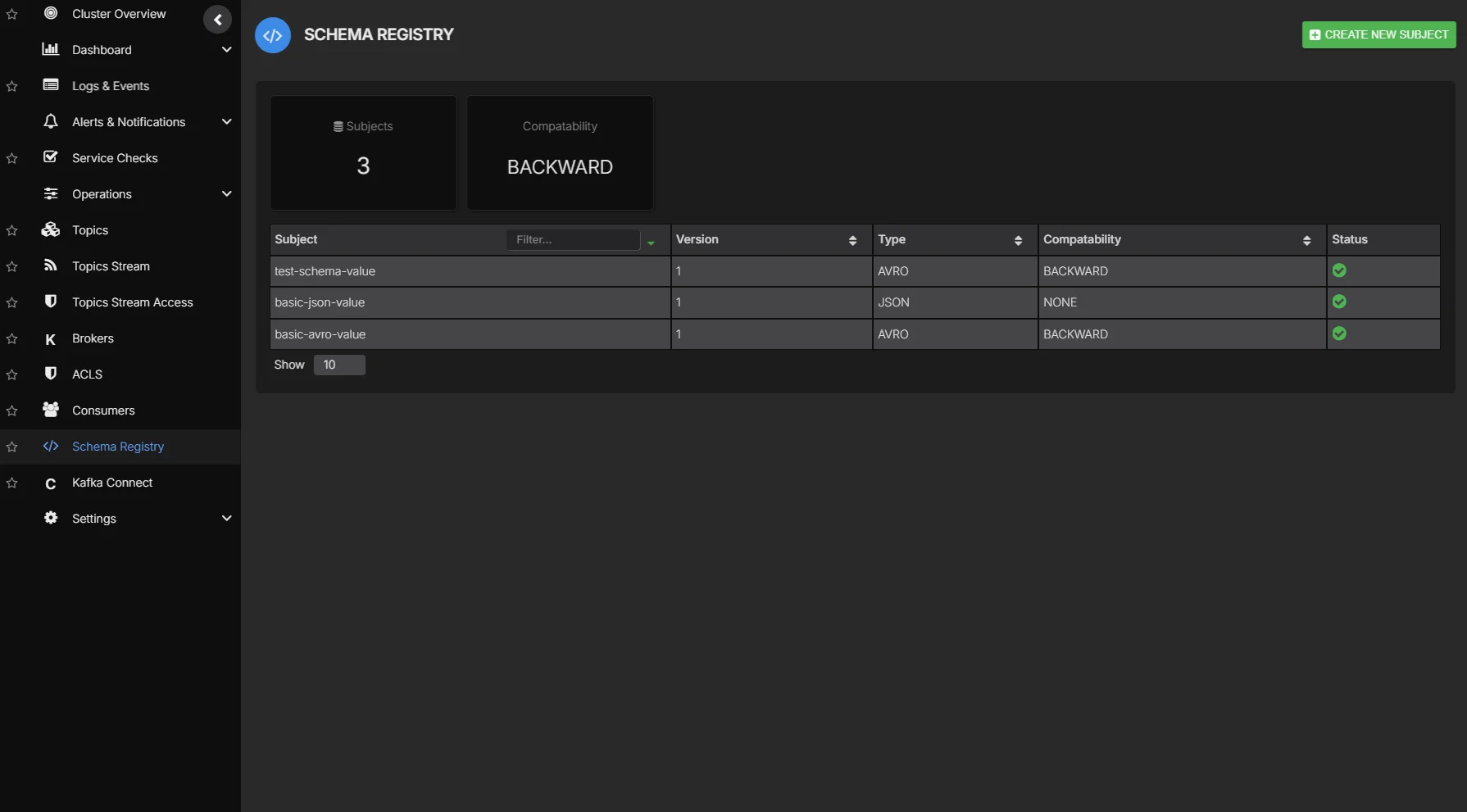
The commercial AxonOps platform adds a schema registry management interface for browsing subjects and editing schemas alongside other Kafka operations. The registry itself remains available as a standalone open source project.
The getting-started guide includes container and binary instructions with client examples. You can also talk to us about deployment and migration support or raise questions and contribute through the project repository.