
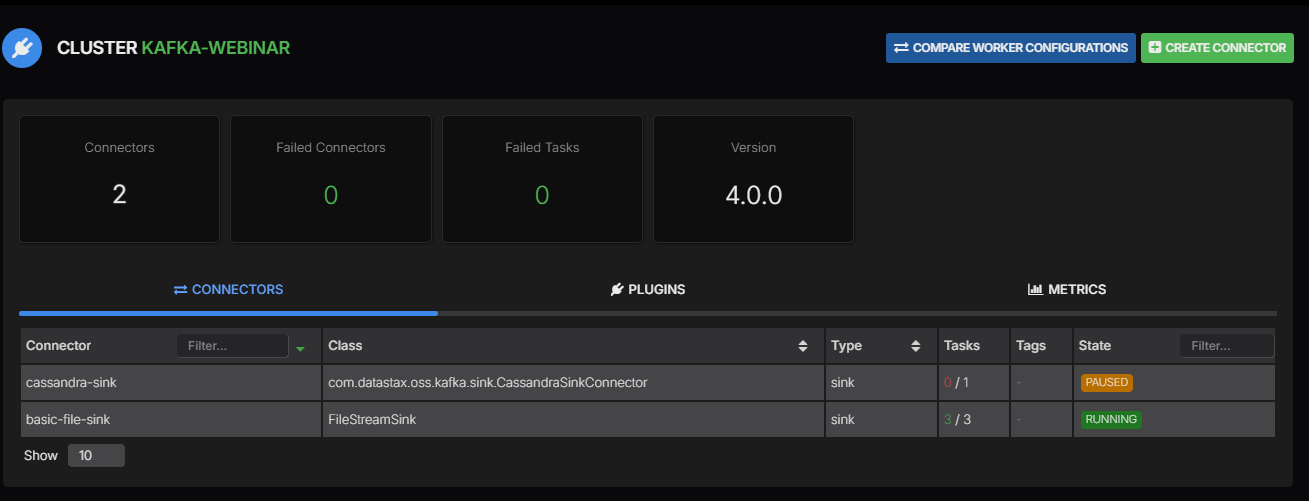
Kafka Connect can write the order changes arriving in a Kafka topic into Cassandra so an application can look up the current order by its ID. We’ll build that example and walk through managing the connector in AxonOps before checking what happens to the data during updates and recovery.
Our pipeline uses the DataStax Apache Kafka Connector with a JSON value and an order ID as the Kafka record key. We’ll follow those fields into a Cassandra table and test deletes as well as inserts. There’s a replay problem with deletes worth understanding before using this configuration for an application that reuses record keys.
This is a Kafka-to-Cassandra sink which consumes records already in Kafka. It doesn’t capture changes made directly in Cassandra or provide Cassandra-to-Kafka CDC.
The Connector and Test Setup
The DataStax connector 1.7.6 release is Apache-2.0 licensed and was published on 25 June 2026. Thank you to its contributors for maintaining an open-source integration between these two projects.
| Component | Version used in the lab |
|---|---|
| Apache Kafka broker and Connect worker | 4.1.2 |
| Apache Cassandra | 5.0.8 |
| DataStax Apache Kafka Connector | 1.7.6 |
| Connector class | com.datastax.oss.kafka.sink.CassandraSinkConnector |
These versions describe the combination tested here rather than a vendor support commitment. The connector’s published Java matrix includes Java 17 and 21 from version 1.7.4 onwards. Its release notes don’t establish support for every Cassandra 5.0 and Kafka 4.1 deployment so include your own compatibility tests before adopting it.
The downloadable lab runs one Kafka broker with one Connect worker and one Cassandra node on a network with no externally reachable interface. It uses synthetic orders without an AxonOps agent so the data tests below are separate from the AxonOps walkthrough. The product screenshot above shows the supplied kafka-webinar environment with its cassandra-sink connector paused.
Map the Orders to Cassandra
We’ll use orders as the Kafka topic and shop.orders_by_id as the destination table. The application can query this table with a known order ID without scanning unrelated orders.
CREATE KEYSPACE shop WITH replication = {
  'class': 'NetworkTopologyStrategy',
  'datacenter1': 1
};

CREATE TABLE shop.orders_by_id (
  order_id text PRIMARY KEY,
  status text,
  amount int
);
Replication factor 1 is for the isolated lab only. Use the replication and consistency settings required by your application in a real cluster. Create the destination table before starting the connector because this example doesn’t create Cassandra schema from incoming JSON.
Here are the first two Kafka records. The key is a plain string while the value contains the order fields as JSON.
| Kafka key | Kafka value |
|---|---|
order-1001 | {"status":"placed","amount":42} |
order-1002 | {"status":"placed","amount":19} |
The mapping reads order_id from the key and the other columns from the value. Keeping the primary key outside the value also means a record can identify the row to delete when its value is null.
| Source field | Cassandra column | Example value |
|---|---|---|
key | order_id | order-1001 |
value.status | status | placed |
value.amount | amount | 42 |
The orders_by_id table keeps current order values rather than every previous version of an order. An application needing order history would use a different Cassandra primary key and mapping. Keep that choice tied to the queries the application needs to run.
Create the Connector in AxonOps
Install the connector JAR on every Connect worker eligible to run this connector and include its directory in the worker’s plugin.path. Restart the affected workers to load it. AxonOps manages the connector through Connect but doesn’t install Java plugins on the worker hosts.
Open Kafka Connect and select the cluster after registering it in AxonOps. Its Plugins tab lists the available connector classes and versions so check for com.datastax.oss.kafka.sink.CassandraSinkConnector before creating an instance. The Connect access settings cover registering the cluster with the AxonOps agent.
Select Create Connector and enter cassandra-orders as the name. The configuration editor takes the following JSON object without an extra config wrapper.
{
  "connector.class": "com.datastax.oss.kafka.sink.CassandraSinkConnector",
  "tasks.max": "1",
  "topics": "orders",
  "contactPoints": "127.0.0.1",
  "port": "9042",
  "loadBalancing.localDc": "datacenter1",
  "key.converter": "org.apache.kafka.connect.storage.StringConverter",
  "value.converter": "org.apache.kafka.connect.json.JsonConverter",
  "value.converter.schemas.enable": "false",
  "topic.orders.shop.orders_by_id.mapping": "order_id=key, status=value.status, amount=value.amount",
  "topic.orders.shop.orders_by_id.consistencyLevel": "LOCAL_QUORUM",
  "topic.orders.shop.orders_by_id.deletesEnabled": "true",
  "ignoreErrors": "None",
  "errors.tolerance": "none"
}
The loopback contact point works because Kafka Connect and Cassandra share an isolated network namespace in this lab. Replace it with Cassandra addresses reachable from your workers and configure the appropriate datacentre and security settings before using the editor in your own environment. Our Kafka security guide covers TLS and authenticated access on the Kafka side. Cassandra connections need their own security configuration too.
The mapping property includes the topic name followed by the keyspace and table names. JsonConverter reads the value without requiring a Connect schema envelope because value.converter.schemas.enable is false. The key uses StringConverter to preserve order-1001 as the Cassandra primary key.
errors.tolerance controls the relevant Connect processing stages while ignoreErrors belongs to the Cassandra connector. We’ve kept both strict for this test because advancing past a failed order would leave the destination incomplete.
Open the detail page after creating the connector and check the Tasks table as well as the connector state. We’ll expect one running task for this single-partition example. The connector creation guide shows the configuration editor and task controls.
Check Inserts and Updates
After sending the two records we can query Cassandra by primary key.
SELECT order_id, status, amount
FROM shop.orders_by_id
WHERE order_id = 'order-1001';
order_id | status | amount
------------+--------+--------
order-1001 | placed | 42Now send another record with the same key and a later Kafka timestamp.
| Kafka key | New Kafka value |
|---|---|
order-1001 | {"status":"paid","amount":42} |
The existing row now has status = 'paid' while order-1002 remains unchanged. Sending that identical update again with its original timestamp still leaves one row for order-1001 because both writes target the same primary key and column values.
The timestamp needs some attention when records arrive out of order. This connector’s generated inserts use the Kafka record timestamp as a Cassandra write timestamp unless the mapping supplies another one. The conversion from milliseconds to microseconds doesn’t add precision to the original Kafka timestamp.
We sent an older placed record at a later Kafka offset after the paid update. Cassandra retained paid because the incoming column writes had an older timestamp. A greater Kafka offset doesn’t automatically make a Cassandra write newer.
| Test | Observed Cassandra result |
|---|---|
| First two order records | Two rows with status placed |
Later paid update for order-1001 | The existing row changes to paid |
| Identical update with the same timestamp | No additional row and no change in values |
Older placed update at a later offset | The newer paid value remains |
This behaviour suits an application that deliberately chooses stable keys and meaningful write timestamps. It doesn’t establish exactly-once processing or define how conflicting values with identical timestamps should be resolved by the application. Cassandra resolves writes at column level so also test partial updates and the timestamp policy used by your producers.
Delete an Order
A Kafka tombstone has a non-null key and a null value. For order-1002 we send the key as before but supply no value bytes rather than the text "null" or an empty JSON object.
The connector deletes the matching Cassandra row when deletesEnabled=true and all table columns are mapped. Its delete detection looks for a mapped record with non-null primary-key values and null regular-column values. Be careful with nullable application records because deletion isn’t selected by a dedicated operation=delete field in this example.
The lab confirmed that order-1002 disappeared while order-1001 remained. We then recreated order-1002 and resent its earlier tombstone with the old Kafka timestamp to check whether it would affect the newer row.
The old tombstone deleted the recreated row because the connector’s generated DELETE doesn’t use the Kafka record timestamp in the same way as its INSERT. You can see the difference in the versioned statement generation code and timestamp mapping code.
Operation on order-1002 | Observed result |
|---|---|
| Send the original order | Row created |
| Send a keyed null value | Row deleted |
| Recreate the order with a new write timestamp | Row created again |
| Resend the earlier tombstone | Recreated row deleted |
An application that reuses keys after deletion needs to test that sequence before relying on topic replay to rebuild a table. Keeping a deletion flag in an ordinary versioned record is one possible alternative to evaluate. It needs an application query policy and its own tests rather than a configuration change made during an incident.
Recover Delivery in AxonOps
We paused Cassandra’s processes while sending order-1003 to Kafka. The connector couldn’t complete the write and its committed position stayed at offset 6 because that was the next record to process. Committing 7 would have moved past the pending order even though it hadn’t reached Cassandra.
The task still reported RUNNING when we sampled it during the interruption even though the new order hadn’t reached Cassandra. After Cassandra became available again the order was delivered without a manual task restart and the committed offset advanced.
Restarting the Connect worker retained its progress and we also tested resetting this isolated connector to offset zero before replaying the original records into the same table. That particular replay finished with the expected values and deletion. The recreated-row test above shows why the same result cannot be assumed for every replay.
Cassandra writes and Kafka offset commits are separate operations so a worker can stop after a successful write and deliver that record again when it restarts. Plan for repeated delivery and check how every destination operation behaves when applied again.
In AxonOps you can investigate the same stages without managing the connector through separate REST requests.
- Open the connector’s Tasks table and check the assigned worker and task state.
- Select that connector and task in Connect Tasks to compare record processing with errors and commit behaviour during the interruption.
- Check Cassandra for availability or write-latency changes over the same period. Increasing the Connect task count won’t restore an unavailable destination.
- Correct the connection or configuration problem first. Use Edit for connector settings and the task’s Restart control when a failed task needs restarting.
- Check that processing resumes and query the affected orders in Cassandra before treating recovery as complete.
Our Kafka Connect monitoring and recovery guide walks through the AxonOps dashboards and failure alerts with product screenshots. It also covers bounded automatic restarts and rejected-record investigation. A running task alone cannot confirm that the expected order values reached Cassandra.
Run the Example
The downloadable lab contains the connector configuration and CQL schema alongside a test runner. Its README provides the pinned image versions and connector download checksum. It requires rootless Podman with Node.js and JDK 17 or later available locally.
tar -xf kafka-cassandra-lab.tar
cd kafka-cassandra-lab
# Follow README.md to download the images and verified connector JAR.
node run.mjs /tmp/kafka-cassandra-run-1 \
  /tmp/kafka-connect-cassandra-sink-1.7.6.jar
Each run retains producer acknowledgements and destination rows together with Connect states and committed offsets. The test containers and their disposable data are removed afterwards. You can inspect the failed-delete replay case without exposing a database or using customer data.
This is a functional integration test rather than a capacity benchmark. It doesn’t cover multi-node failures or Cassandra counters and TTL expiry. Production evaluation also needs realistic payload sizes and partition counts alongside a defined retention and replay policy.
Once both systems are connected to AxonOps you can manage the connector and investigate the Kafka and Cassandra clusters in the same platform. Explore Kafka Connect management and Cassandra monitoring and operations or open the demo sandbox to try the interface.