
When your Kafka clusters are included in an enterprise audit you’ll need to show how access is controlled and how changes are reviewed across the deployment. You may be asked who can read customer records or whether a service account can change the permissions protecting them. You’ll also need evidence that the security controls are working and that someone follows up when they aren’t.
That work extends to the Connect workers and the people who can browse messages as well as the brokers themselves. AxonOps brings the Kafka compliance checks into one place so you can find gaps in the configuration and investigate the activity behind them. We’ll use the product views in this article to work through what an enterprise should implement and how AxonOps helps you check it.
Our Kafka security guide walks through TLS and SCRAM configuration with topic and consumer-group ACLs. It includes tested commands for permitted and rejected requests so you can check the access controls discussed here before gathering the audit evidence.
Preparing Kafka for an Audit
Start by agreeing which clusters and data flows are in scope with your security and compliance teams. Include the services that move data into or out of Kafka and identify who owns each part of the deployment. A secured broker connection leaves work to do if a Connect REST endpoint is still exposed or a support account has unrestricted access to customer messages.
The assessment depends on the framework your organisation uses. ISO/IEC 27001 addresses the organisation’s information security management system and risk management. SOC 2 uses the Trust Services Criteria to assess controls within an agreed system scope. PCI DSS has specific requirements where the deployment falls within payment-card security scope. The controls and evidence need to match your assessment rather than a generic claim that Kafka is compliant.
The following is a practical starting point for that discussion. Agree the review periods and retention requirements before collecting evidence so you can demonstrate the controls over the period being assessed.
| Control | What to implement | Evidence to retain |
|---|---|---|
| Encryption and network access | Encrypt the relevant Kafka connections and service endpoints. Restrict access to broker and controller networks and protect stored data under your security policy. | Listener and endpoint configuration with network rules and certificate records. Storage and key-management evidence where required. |
| Authentication | Give applications identifiable service accounts. Manage credential expiry and rotation. Use corporate identity controls and MFA for human administration where required. | Account ownership and lifecycle records with authentication configuration and rotation evidence. |
| Least privilege | Enable authorisation and restrict topic and consumer-group access. Review wildcard grants and superusers. | ACL reviews with approved access requests and tests of permitted and rejected operations. |
| Segregation of duties | Separate application access from privileged administration. Define approval and emergency-access procedures. | Role assignments and access reviews with approval records and documented exceptions. |
| Change control | Review configuration and ACL changes through the agreed process. Detect changes made through other tools. | Approved change records and configuration history showing what changed and who authorised it. |
| Audit logging and response | Collect the relevant security and administrative events. Protect the logs and review unexpected activity. | Time-stamped records with retention settings and evidence of investigation and resolution. |
| Version and plugin management | Inventory deployed software and review applicable security advisories. Control which connector plugins can be installed. | Version and plugin inventories with patch decisions and verified remediation records. |
| Data governance | Identify sensitive topics and assign owners. Set retention and permitted uses according to the data’s classification. | Topic ownership and classification records with retention reviews and access approvals. |
| Availability and recovery | Configure replication for the required resilience and rehearse recovery. | Replication configuration and incident history with recovery test results. |
These controls should cover the management tools too because access to a Kafka dashboard can grant access to production operations or message contents. Our Kafka security documentation covers the underlying authentication and encryption settings alongside Kafka ACLs.
Finding Security and Compliance Gaps with AxonOps
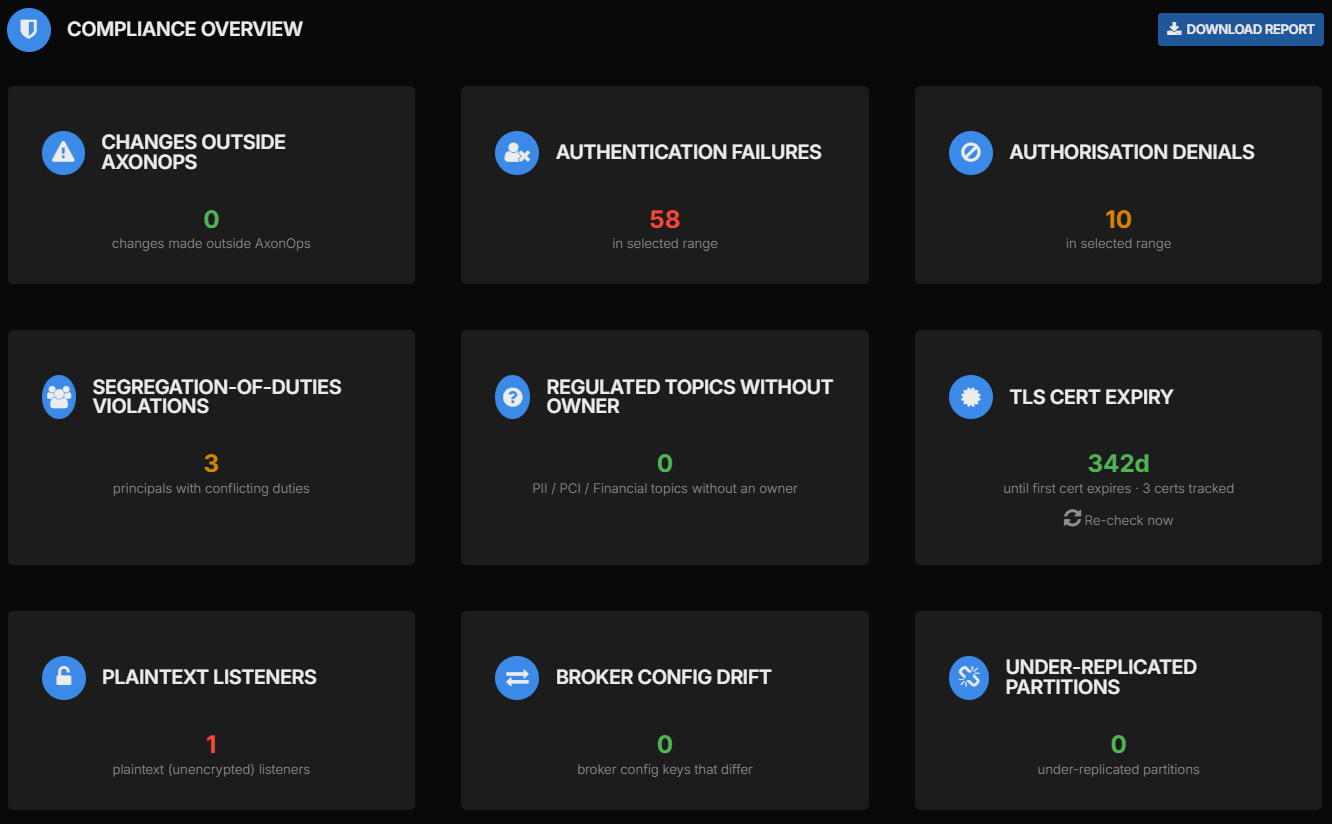
The Compliance Overview shown above lets you begin with the checks that need attention. In this example there is one plaintext listener and three principals flagged for conflicting duties. You can also see authentication failures and authorisation denials alongside certificate expiry and configuration drift.
Each finding needs to be read against the control it checks. A plaintext listener conflicts with a policy requiring encrypted Kafka traffic. An authorisation denial may show that Kafka correctly refused a prohibited request. A green zero is useful only when the relevant service is connected and the check has the data it needs.
| Finding | How to interpret it | Next action |
|---|---|---|
| A required control is missing | For example an unencrypted listener where policy requires TLS | Fix the configuration or record an approved exception with an owner and review date |
| An operation was rejected | The request may be unwanted activity or a misconfigured client. It may also be an expected denial test. | Review the reason and source against the application’s intended access |
| No issue was detected | The available observations did not trigger that check | Confirm coverage and review the period before using the result as evidence |
| A check is unavailable or a value is unknown | The view cannot establish the current position for that item | Restore collection or supply the missing integration before closing the review |
This gives the Kafka team a list of specific findings to investigate and gives the reviewer a way to connect each finding to the required control. The screenshots are example product views and should not be treated as evidence for your own deployment or assumed to cover identical time ranges.
Encryption and Network Access
Review every listener and endpoint that carries data or accepts administrative requests. That includes inter-broker traffic and controller connections as well as client listeners. Connect REST interfaces and cross-cluster replication also need to be included in the review.
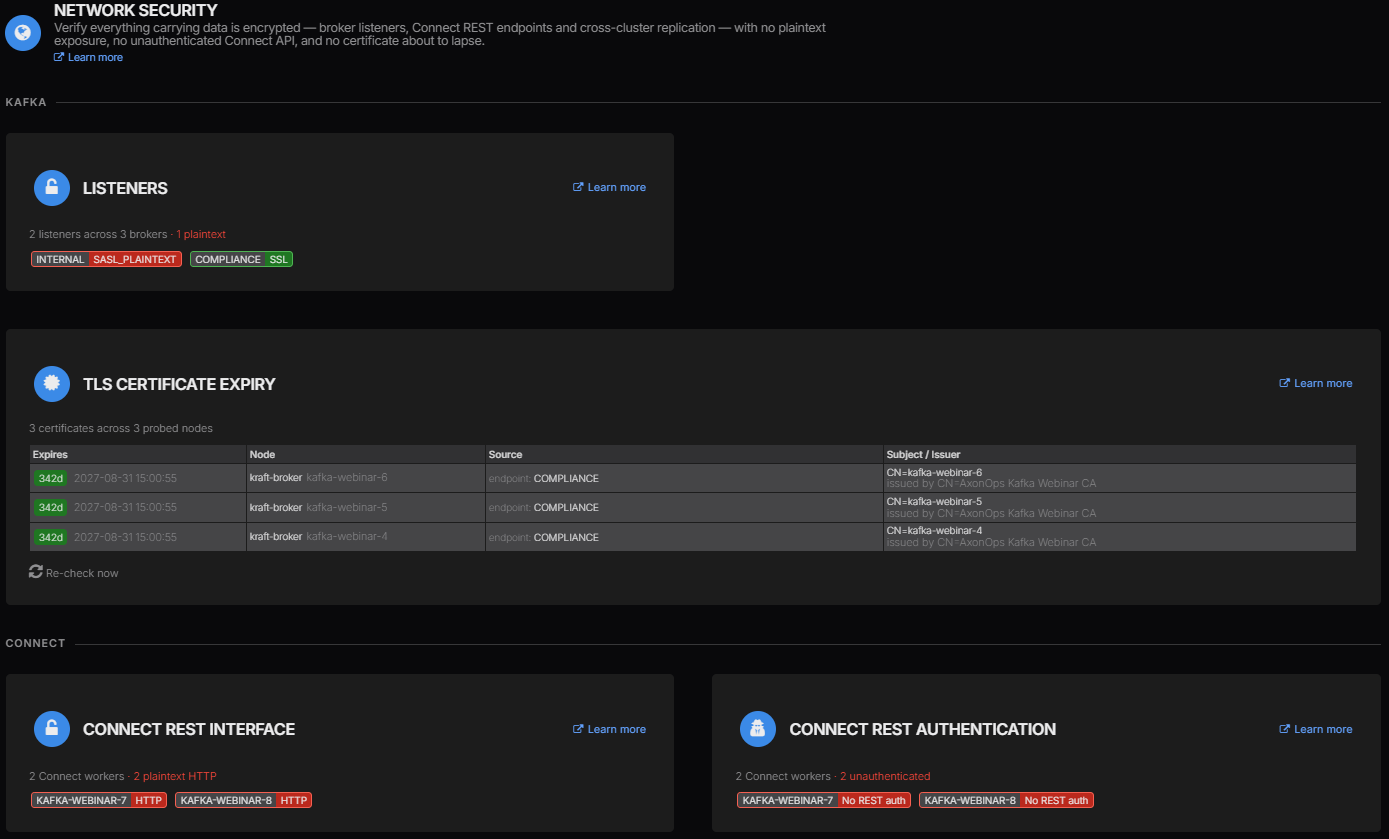
Here the internal listener uses SASL_PLAINTEXT while another listener uses SSL. SASL authentication does not make a plaintext connection encrypted so a successful login on that internal listener doesn’t satisfy a requirement for TLS. Moving it to SASL_SSL requires the connecting clients to be configured for TLS too.
The same view identifies two Connect workers using HTTP without REST authentication. Securing a connector’s connection to Kafka does not secure its management API. Review how that API is reached and apply the required authentication and transport protection without leaving a directly reachable route around them.
AxonOps also shows the certificates it has checked with their expiry dates and issuing details. Use that information to plan renewal and verify the replacement certificate after deployment. Compare the reported endpoints with your service inventory so certificates on other endpoints are included in the renewal process. Our Kafka encryption guide explains the TLS configuration and hostname verification needed when correcting these findings.
Authentication and Access Reviews
Use separate identities for applications and avoid distributing a shared administrator credential to make connection problems disappear. Review what each principal can do with topic and consumer-group resources as well as any cluster-wide permissions. Test the requests the application should make and the requests it must be prevented from making.
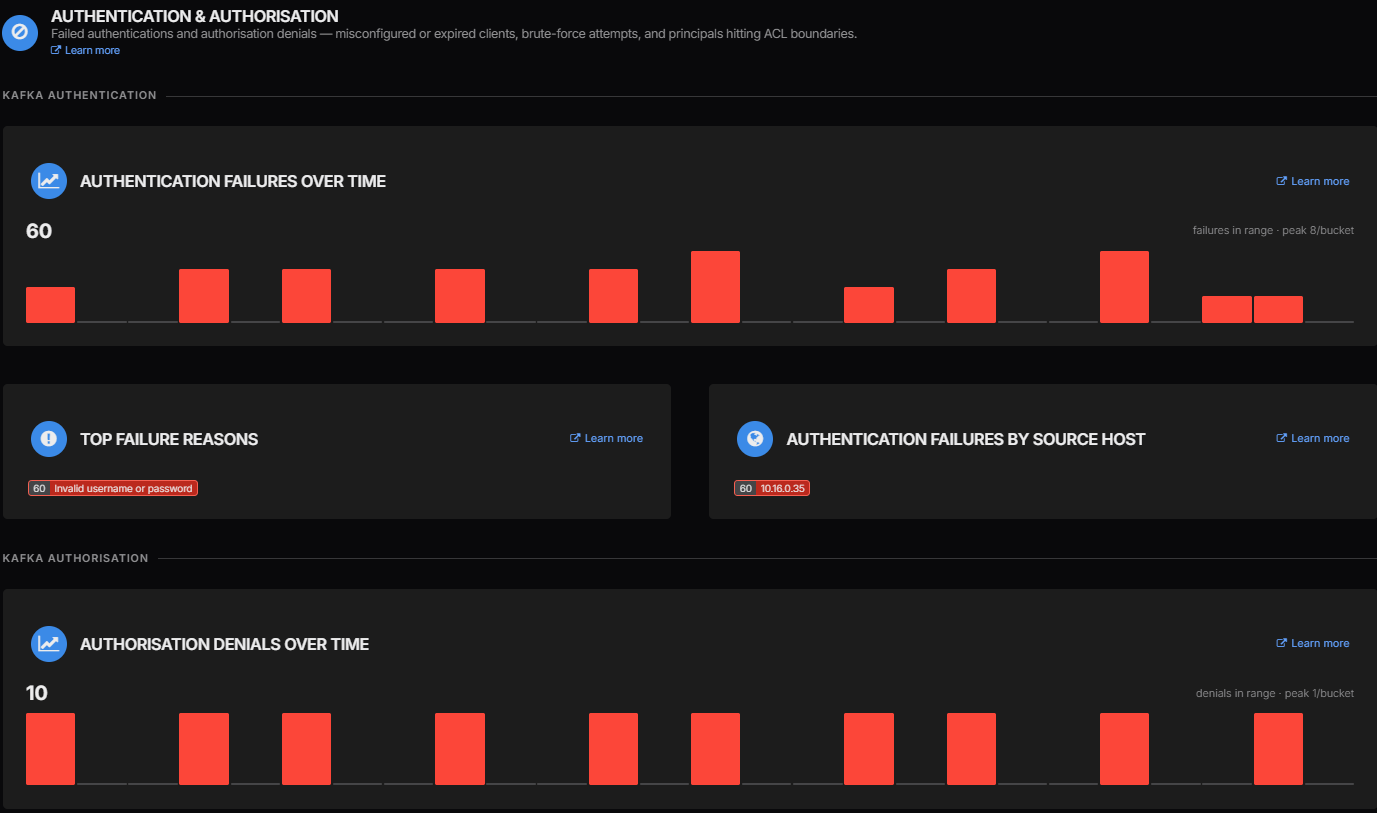
The example shows invalid-credential failures associated with one source host. You can start with the application using that host and check whether its password was rotated or its configuration changed. Unexpected requests may need an incident investigation but a failure count alone doesn’t establish that an attack occurred.
Authorisation denials need a similar review against the requested operation. If a reader tries to write to a restricted topic then refusing the request is the behaviour we want. Giving it broader access to clear the failure would undermine the permission review. Keep the relevant events with the investigation or test record so the reason for the denial remains clear.
AxonOps provides Kafka ACL management for reviewing and changing access. Human message inspection needs its own controls too. The AxonOps Message Stream Viewer combines enterprise identity with topic-scoped access grants and short-lived authorisation tokens enforced by the agent. Audit events include token creation and changes to those grants so reviewers can trace who was given access to inspect messages.
Change Control and Segregation of Duties
Keep application permissions separate from the privileges used to administer Kafka. An account that can both write business records and alter the controls protecting them deserves review against your segregation-of-duties policy. Where an exception is necessary it should have a named owner and an agreed review date.
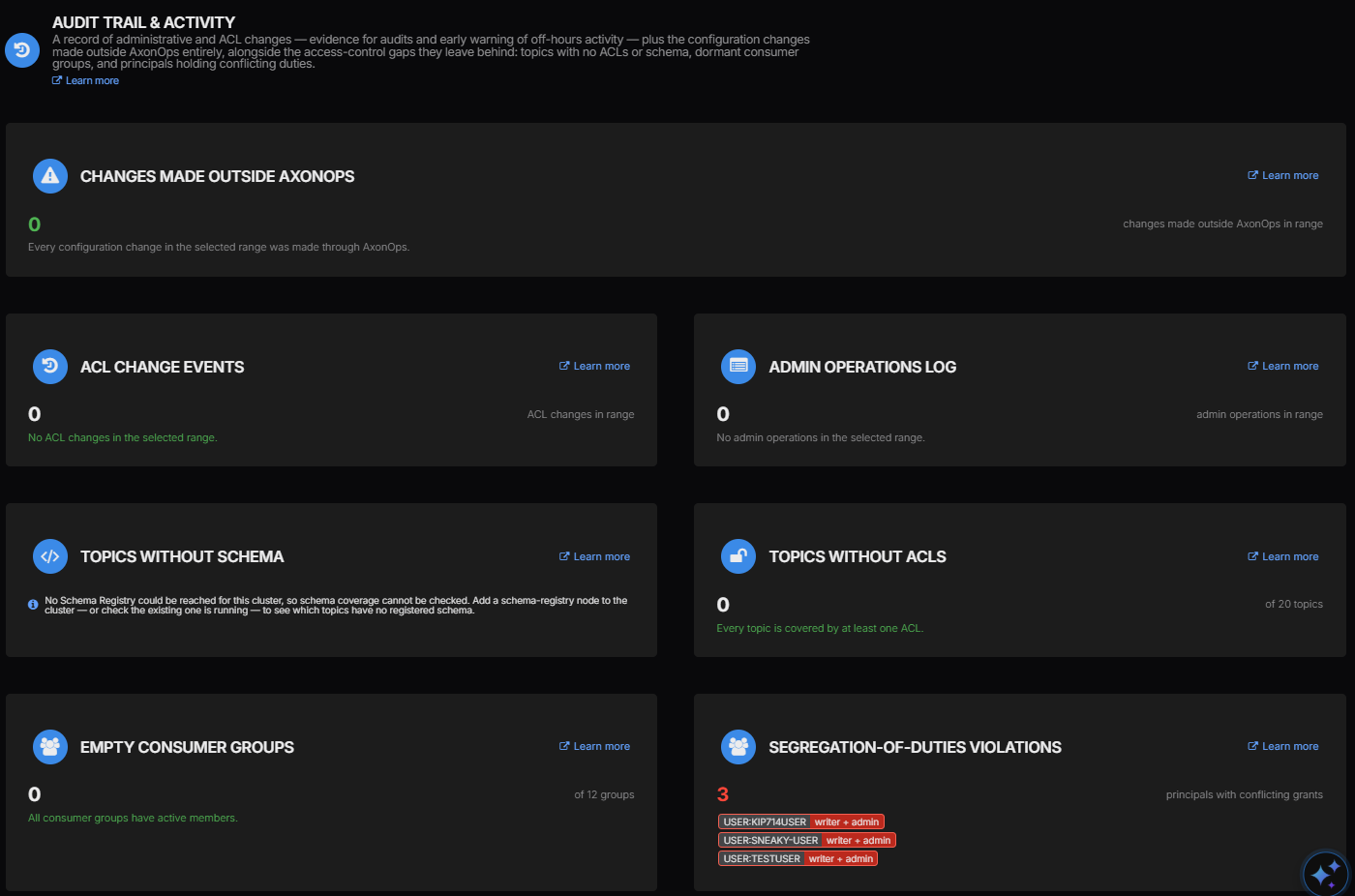
AxonOps flags three principals with combined writer and administrator duties in this view. That gives the access reviewer specific accounts to examine rather than requiring them to identify those combinations from an unorganised ACL listing. Resolve unnecessary grants and retain the approval for any combination your policy permits.
For change investigations the Config Drift Detection feature records before-and-after differences for enabled resource types. It covers topics and ACLs alongside broker configuration and configured Connect and Schema Registry resources. Changes without a matching AxonOps operation are labelled as made outside AxonOps and raise a critical alert.
Enable both organisation-level storage and the required per-cluster tracking options before relying on this history. The documented interval is 300 seconds so a change made and reverted between observations may not appear. Keep the administrative logs and deployment records too. Password rotation also needs separate evidence because a change behind a constant masked value cannot produce a configuration diff.
A change labelled as made outside AxonOps may come from an approved deployment pipeline. Follow it back to the approval and deployment record before deciding whether it breached the agreed process.
Versions and Connector Plugins
An enterprise needs an inventory of the software it runs so security advisories can be assessed against the actual deployment. Include the brokers and controllers together with Connect workers and their installed plugins. Agree how updates are approved and how remediation is verified after the rollout.
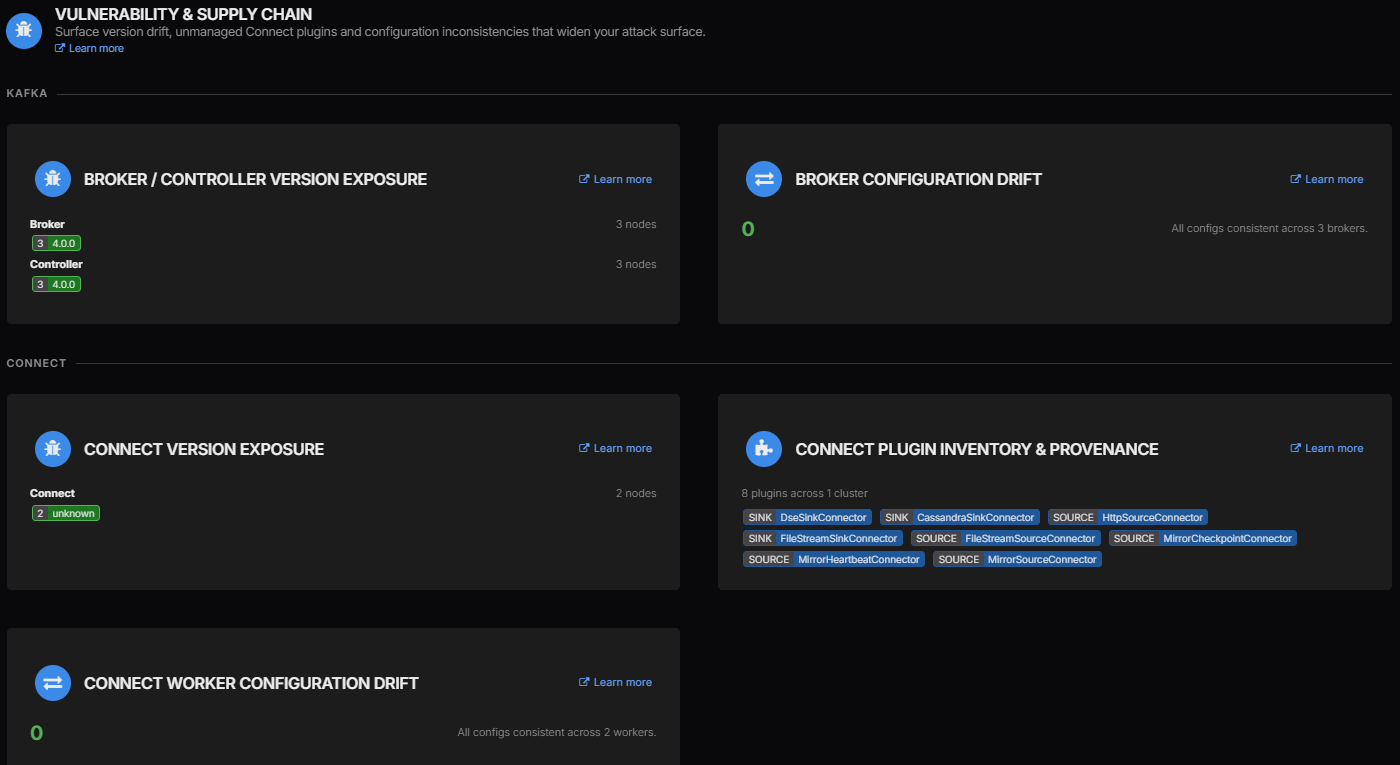
The broker and controller versions are visible here alongside an inventory of eight Connect plugins. The two Connect worker versions are reported as unknown so the next step is to establish those versions before checking the relevant advisories. An unknown version cannot be used as evidence that the worker is up to date.
Use the inventory to compare installed components with the approved software list and the applicable security advisories. A component appearing in this view does not establish that its binary has been verified or that it is free of vulnerabilities. Keep provenance and integrity checks with the deployment process and record the decision for each applicable advisory.
The configuration drift panels also help identify differences between brokers or Connect workers. Review those differences against the settings appropriate to each role. A zero difference count can mean that all workers share the same configuration even when that configuration needs correcting.
Data Ownership and Availability
Assign an owner to sensitive topics so access and retention decisions have someone accountable for them. AxonOps highlights regulated topics without an owner in the Compliance Overview. Review the topic classifications as well as the owner count because an unclassified sensitive topic can otherwise be left out of that review.
The audit view also identifies topics without ACL coverage and topics whose schema coverage cannot be established. In the example every topic has at least one ACL but that still leaves the actual grants to review. A permissive wildcard grant would not become appropriate simply because an ACL exists.
Schema coverage is unavailable because Schema Registry could not be reached. Restore that integration before drawing a conclusion about registered schemas. Whether a topic needs a schema depends on your data governance policy rather than a universal audit requirement. Empty consumer groups likewise need an ownership review because an inactive group can belong to a legitimate scheduled workload.
For availability controls the overview includes under-replicated partitions. Investigate any affected partitions and retain the incident and recovery records relevant to your assessment period. A zero count at review time doesn’t replace recovery testing or prove that the cluster was healthy throughout the period.
Some evidence will come from the surrounding infrastructure and organisational processes rather than these Kafka views.
| Area | Evidence to obtain alongside AxonOps findings |
|---|---|
| Stored data and keys | Disk or volume encryption configuration with key-management and access records |
| Retention and permitted use | Approved topic classifications and retention settings with checks covering downstream copies and backups |
| Human access | Identity-provider access reviews and MFA configuration with joiner and leaver records |
| Evidence protection | Central log retention and restricted access with tamper protection appropriate to the assessment |
| Recovery | Restore and failover test results measured against the agreed recovery objectives |
Keeping the Audit Evidence
Use AxonOps during the normal operating cycle so findings can be investigated before an auditor asks for them. Give each unresolved item an owner and keep its remediation record linked to the control being checked. A regular review should also confirm that collection is still working for every service in scope.
- Confirm the cluster and review period together with the connected services and enabled checks. Record any missing coverage before interpreting the results.
- Use Download Report in the Compliance Overview and retain the report with the review record. Include the cluster identity and collection date so reports from different environments remain distinguishable.
- Investigate the findings using the relevant security view and configuration history. Keep the supporting events with the approved change or incident record.
- Correct the configuration through your change process and repeat the affected check. For access changes include both a permitted operation and an operation that should still be rejected.
- Retain the result of that follow-up together with any approved exception and its review date. Protect the evidence and keep it for the period your assessment requires.
AxonOps reduces the work of finding the Kafka configuration and activity that needs attention. The review can move from locating a plaintext listener or conflicting grants to deciding who will correct them and checking the result. Audit readiness depends on following through on those findings as well as retaining the evidence of the controls that are working.
You can explore the wider platform in the AxonOps Demo Sandbox or arrange a Kafka compliance walkthrough with us to review the controls and evidence your team needs.